What are TCP and UDP?
Every time you browse the web, stream a movie, join a video call, or play an online game, data is moving across the internet. That data usually travels between IP addresses using one of two protocols: TCP (Transmission Control Protocol) or UDP (User Datagram Protocol).
Both operate at the “transport layer” of the TCP/IP model, which determines how devices communicate over networks. The transport layer sits on top of the IP layer — which handles addressing — and controls delivery behavior to ensure data gets from one application (like your browser) to another (like a web server).
How TCP works (Transmission Control Protocol)
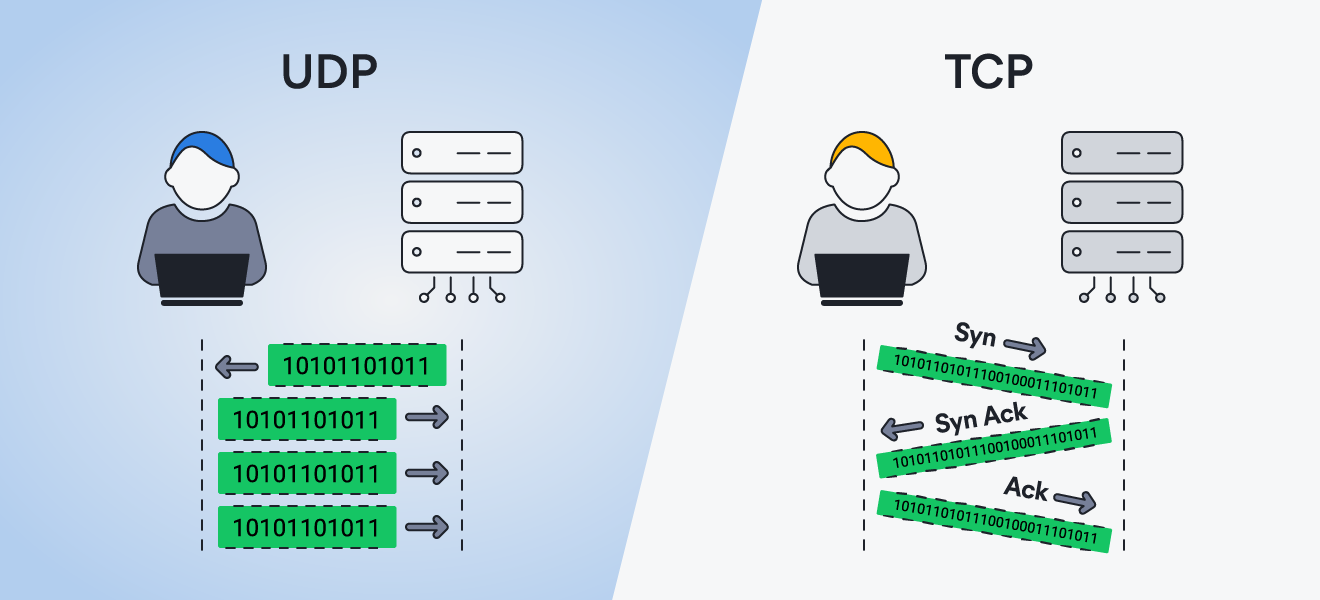
TCP works by establishing a connection between two devices using a three-way handshake — often described as the SYN, SYN-ACK, ACK process. One device sends a SYN (synchronize) request, the other responds with SYN-ACK (synchronize-acknowledge), and the first replies with an ACK (acknowledge), confirming the connection before any data is sent.
Once connected, it breaks data into small packets, numbers them, and sends them across the network.
This setup allows TCP to:
-
Confirm data arrives successfully
-
Resend missing data
-
Deliver packets in the correct order
-
Adjust transfer speeds to prevent network congestion
As packets arrive, the receiving device acknowledges each one. If any packet is lost or arrives out of order, TCP automatically retransmits it and reorganizes the sequence. This error-checking and confirmation process ensures accuracy, making TCP ideal for activities like web browsing, email, and file transfers, where data integrity matters most.
How UDP works (User Datagram protocol)
Unlike TCP, UDP does not establish a connection before sending data. Instead, it sends small units of data — called “datagrams”— directly to the recipient without verifying delivery. This “fire-and-forget” model is designed for speed and low delay rather than guaranteed reliability, meaning data may arrive out of order, arrive more than once, or not arrive at all.
Because UDP skips acknowledgment and retransmission processes, it reduces network delay and uses fewer system resources. This makes it ideal for real-time applications such as:
-
Live streaming
-
Online gaming
-
Video and VoIP calls
-
DNS queries
For example, during a video call, it’s usually better to miss a tiny piece of audio than to freeze the entire conversation while waiting for lost data to be resent.
Key differences between TCP and UDP
The main difference between TCP and UDP is that TCP is connection-oriented, while UDP is connectionless. But choosing the right protocol requires understanding what those terms actually mean in practice.
Let’s break down the key differences and their real-world implications:
Connection-oriented vs. connectionless
TCP uses a process known as the three-way handshake to establish a connection before transmitting data. During this setup, both sides exchange and verify information such as sequence numbers. This handshake creates a reliable session and allows TCP to guarantee ordered, complete delivery.
UDP has no handshake and no persistent connection. Data is sent immediately, without verifying that the receiver is ready or tracking the state of the communication. As a result, UDP cannot provide the same delivery guarantees as TCP.
Reliability and error-checking mechanisms
Because TCP establishes a connection with sequence numbers, it can track packets and reorder them if they arrive out of sequence. Each packet received is acknowledged by the recipient. If a packet is lost in transit and no acknowledgment is received within a specific time frame, TCP automatically retransmits it. This process enables TCP to provide reliable, complete delivery.
UDP does not include acknowledgments or retransmissions, so it cannot guarantee delivery, order, or duplication protection. If a packet is dropped, it is simply lost, and the protocol continues sending data without correction. For applications where occasional packet loss is acceptable — such as live video or VoIP — this tradeoff is often worthwhile.
Speed and efficiency
TCP prioritizes completeness and integrity, while UDP prioritizes timeliness and reduced overhead in terms of connection setup, acknowledgments, and retransmissions. This means UDP delivers data faster and with less complexity.
By comparison, TCP introduces more overhead and potential latency due to its rigorous reliability mechanisms. That extra structure makes it more robust, but also heavier and slower. The choice depends on whether reliability or speed is the priority.
Use cases and applications
To better understand the differences, it helps to look at practical examples. Below are a few common networking scenarios, along with a quick explanation of when TCP or UDP is the better choice depending on what you’re trying to do.
-
Online gaming. Real-time games require fast data transmission with minimal delay. UDP fits this need well. A few lost packets rarely affect gameplay significantly, and modern games are designed to handle minor data loss gracefully.
-
Online banking and shopping. Financial transactions demand accuracy. Even a “small” error, such as a single wrong digit in a payment order, would be unacceptable. TCP is the clear choice because it guarantees data integrity and proper sequencing.
-
Watching livestreams. The defining feature of a livestream is immediacy. A brief drop in quality is preferable to buffering delays. UDP keeps the data flowing, even if some packets are lost, making it well-suited for live streaming.
-
Sending and receiving emails. Emails often carry sensitive or critical information, including invoices, password resets, and legal notices. TCP ensures that messages are delivered completely and in the correct order.
-
VoIP calls. Voice over IP is another real-time application that cannot pause to retransmit lost packets. Minor data loss is less disruptive than delays. UDP supports the continuous flow of audio that VoIP requires.
-
Reading this webpage. When loading a webpage, accuracy matters. If data arrived out of order, the page would be unreadable. TCP ensures that web content is delivered exactly as intended, which is why HTTP and HTTPS rely on it.
When to use TCP vs. UDP
Choosing between TCP and UDP comes down to one core tradeoff: reliability versus speed. If you need data immediately and can tolerate occasional loss, UDP is the better fit. If you need every piece of information to arrive intact and in the correct order, TCP is the right choice.
Here are the main use cases where that distinction plays out in practice:
 Streaming and gaming
If you’re streaming, gaming, or making a video call, latency matters more than perfect accuracy. These activities require data to be delivered in as close to real time as possible, so they typically use UDP because it keeps data moving without waiting for lost packets to be resent. In real-time communication, it’s often better to lose a small piece of data than to delay everything.
If you’re using a VPN to hide your IP address, UDP is typically employed by VPN protocols to maintain speed and responsiveness — two critical factors for streaming and gaming.
 Secure browsing and file transfers
When accuracy and order are non-negotiable, TCP is the clear choice. Most standard web browsing relies on TCP, particularly when using HTTPS, where encrypted data must arrive completely and in sequence between your browser and the web server. TCP is also used for email retrieval, file transfers, and remote access tools, where missing or corrupted data would cause errors, security risks, or incomplete transactions.
Enhance your online experience with AVG Secure VPN
Security shouldn’t come at the expense of speed. AVG Secure VPN lets you choose the VPN protocol that best fits your needs and switch connection types anytime. With flexible protocol options and strong encryption, you can enjoy a faster, more stable, and more private online experience.