What is a Pegasus spyware email scam?
A Pegasus spyware email scam is a fear-based extortion scam in which an internet scammer threatens to expose your private information unless you pay a ransom. The scammer falsely claims to have infected your device with Pegasus spyware — a sophisticated surveillance tool — and gained access to your photos, passwords, messages, or other sensitive data.
In reality, most Pegasus extortion emails are hoaxes. Scammers who send Pegasus spyware emails have rarely infected your device or obtained the compromising material they claim to possess. Instead, they exploit Pegasus's notorious reputation as a scare tactic to make their threats seem credible.
These scams are often sent en masse to thousands of recipients, using social engineering tactics to generate urgency and fear to elicit a quick payment, usually in cryptocurrency. To make their threats more convincing, scammers may claim to have recorded intimate footage through your camera or obtained embarrassing private photos.
Some messages even include countdown timers, threats to contact your friends or family, or personal details such as your address, phone number, or an old password obtained from a previous data breach. Although these details can make the email seem frighteningly personal, they don't prove your device has actually been infected with Pegasus spyware.
Common traits of Pegasus scam emails
Pegasus scam emails typically use threats, intimidation, and urgent payment demands to convince you that your device has been hacked. Common warning signs include cryptocurrency ransom requests, claims of stolen intimate footage, spoofed email addresses, and strict payment deadlines.
Here are the main warning signs of Pegasus email scams to watch for:
-
Ransom demands: Pegasus scammers typically demand payment in cryptocurrency, such as Bitcoin, claiming they'll release your private information unless you pay.
-
Threats involving intimate photos or webcam footage: Pegasus emails often use sextortion tactics, falsely claiming the sender has recorded you in intimate situations or obtained compromising images.
-
Spoofed email addresses: Scammers may use email spoofing to make the message appear to come from your own address, presenting this as supposed proof that they've hacked your account or device.
-
Personal information: Emails may include your address, phone number, or an old password to make the threat seem credible. Scammers often obtain these details from public records, data brokers, or previous data breaches rather than through spyware.
-
Urgent deadlines: Countdown timers or demands to pay within 24 hours create pressure to act before you've had time to question the claims or seek advice.
-
Photos of your home or family: Some scammers include images of your property or relatives to suggest they're monitoring you. These photos are usually scraped from publicly accessible sources, such as social media, mapping services, or real estate listings.
-
Instructions not to contact anyone: Pegasus scammers may warn you not to contact the police, friends, or family, threatening to release your information or infect your contacts if you do. This is intended to isolate you and make paying seem like your only option.
Real examples of Pegasus spyware scam emails
Pegasus email scams continue to circulate, using fear, embarrassment, and urgency to extort victims. Alarming subject lines and convincing threats can catch recipients off guard, while AI tools can help scammers generate and distribute phishing and hoax emails at scale.
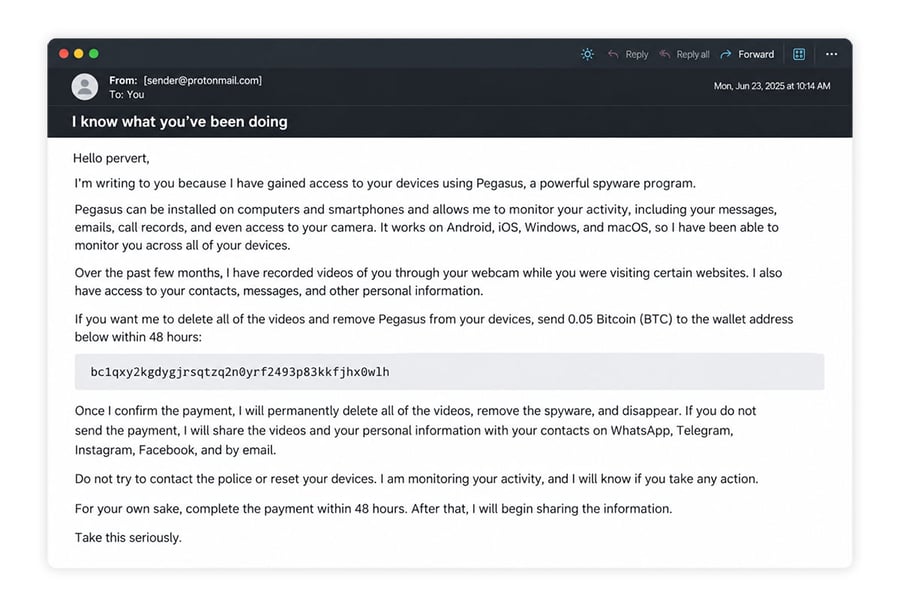 Many Pegasus scam emails follow a similar “Hello pervert” script.
One of the most widely reported examples is the "Hello pervert" sextortion email, which started circulating in 2024, claiming the sender installed Pegasus spyware on the recipient's device and secretly recorded compromising footage through their webcam. The message typically begins:
Hello pervert, I installed Pegasus spyware on your computer, and I’ve recorded all sorts of ‘embarrassing’ videos of you.
Although the wording varies, many Pegasus scam emails follow a similar script. The sender claims to have monitored your device for months, gained access to your camera or private files, and collected embarrassing material. They then threaten to release it unless you pay a cryptocurrency ransom.
Common examples of claims found in these emails include:
-
“Your device has been infected with Pegasus.”
-
“I have access to your camera and recordings.”
-
“I will release compromising footage unless you pay $1,000 in Bitcoin.”
These claims are designed to frighten you; they do not prove your device has been compromised. Most such messages provide no credible evidence of spyware infection or stolen footage, even when they include personal details obtained from public sources or previous data breaches.
How to tell if a Pegasus email is fake
Most Pegasus emails are fake, but receiving one can still be unsettling. Fortunately, you can often identify a likely scam by checking the sender's details, recognizing common extortion tactics, and looking for credible evidence of an actual security breach.
Use the following checks to help distinguish a hoax threat from a genuine security concern:
Check for classic scam signals
Traditional scam warning signs include poor grammar, spelling mistakes, and repetitive language. However, these clues are becoming less reliable as scammers increasingly use AI to generate convincing messages with correct grammar and polished wording.
Instead, focus on what the sender is trying to make you do. Threats, demands for immediate payment, and attempts to frighten or isolate you are strong indicators that you’re dealing with an extortion scam.
Requests for payment in cryptocurrency are another major red flag. Scammers often demand Bitcoin or other cryptocurrencies because transactions are generally difficult to reverse, making stolen funds harder to recover.
Look at sender details and message format
Inspecting an email's sender information and formatting can help you identify suspicious messages, although these details alone can't establish whether a threat is genuine. For example, some Pegasus scammers deliver their threats through PDF attachments, suspicious links, or QR codes, rather than placing them directly in the email body — potentially helping the messages evade certain spam filters.
Checking who the email is from can also help you identify a scam. However, the “From” line in the email header isn’t always reliable, so expand the sender details to view the full address. Scam email addresses often contain misspelled domains (e.g., donotreply@appel.com) or long strings of random numbers and letters (e.g., af89d7as9d8f@x98hfk.com).
Some Pegasus scam emails even appear to come from your own email address. Scammers can use email spoofing to falsify sender information, making it seem as though they've hacked your account or device. If this happens, check your account's email security settings for unfamiliar logins, connected devices, or unauthorized changes.
If you notice suspicious activity, your account may genuinely have been compromised: change your password, sign out unknown devices, and enable multifactor authentication.
Distinguish fear tactics from actual device compromise
Pegasus scammers try to pressure you to act out of fear and urgency because they don’t have any real proof that they’ve compromised your device. If you learn to spot their fear tactics for what they really are, you can often tell when a Pegasus email is fake.
Scare tactics used in Pegasus scam emails typically follow a predictable pattern:
-
A fabricated crisis: Claiming your device has been infected with Pegasus spyware or that your private information has been stolen.
-
A payment demand: Insisting you send a cryptocurrency ransom to prevent further harm.
-
An urgent deadline: Giving you only a few hours or days to comply, leaving little time to investigate.
-
Threats of serious consequences: Claiming they'll share intimate images, expose financial information, or contact your friends and family if you refuse to pay.
Look closely at any supposed proof the sender provides. Even seemingly private images or screenshots should be treated cautiously, as they may be fabricated, manipulated, or obtained through unrelated breaches. Their presence doesn't necessarily prove a Pegasus infection.
What to do if you receive a Pegasus spyware email
If you receive a Pegasus spyware email, report the message as phishing or spam, block the sender, and delete it. Don't reply, pay the ransom, click any links, or open attachments, as this may confirm that your email address is active, potentially attracting further scam attempts.
Then check your email, Apple or Microsoft accounts, social media profiles, and financial accounts for unfamiliar logins, unauthorized transactions, or unexpected changes. These warning signs don't necessarily indicate spyware, but they could suggest an account has been compromised.
If you notice suspicious activity, take the following precautions:
-
Secure affected accounts: Change compromised passwords, sign out unfamiliar devices, and enable two-factor authentication (2FA) to strengthen your email account security.
-
Protect your finances: If you notice unauthorized transactions or suspect your financial details have been stolen, contact your bank immediately.
-
Replace exposed passwords: If the scam email includes a password you still use, change it wherever it's active. Scammers sometimes obtain real credentials from previous data breaches, so use a unique, strong password for every account.
-
Run an antivirus scan: Use trusted antivirus software to scan your device for malware, particularly if you clicked a link or opened an attachment in the email. A scan can help detect common threats, but sophisticated spyware like Pegasus may evade conventional antivirus detection.
What to do if you already responded to a Pegasus email
If you've already interacted with a Pegasus scam email, don't panic. These messages typically contain false claims about spyware infections or stolen data, but you could still be at risk. The steps you should take depend on how exactly you responded:
-
If you replied: Stop communicating with the sender, block their address, and report the email as phishing. Replying alone doesn't mean your device is infected, although it may encourage further scam attempts.
-
If you clicked a link or opened an attachment: Avoid further interaction and run a trusted malware removal tool. Clicking a link doesn't automatically infect your device, but malicious websites and files can pose a risk. If you entered a password, change it immediately using the legitimate website or app.
-
If you scanned a QR code: Check where it directed you. If you entered login credentials or downloaded anything, change affected passwords and scan your device for malware.
-
If you paid the ransom: Contact your bank or card issuer immediately to report the fraud and ask whether the transaction can be reversed. Cryptocurrency payments are usually difficult to recover, but you should still report the scam.
-
If you shared sensitive information: Contact your bank if you disclosed payment details, monitor your accounts for unauthorized activity, and consider freezing your credit if you exposed your Social Security number (SSN) or other identity information.
How to protect yourself from Pegasus spyware and scams
Protecting yourself from Pegasus spyware and related scams starts with recognizing suspicious messages, keeping your devices updated, and securing your online accounts. While genuine Pegasus infections are extremely rare, emails claiming your device has been infected are a common extortion tactic.
Pegasus is sophisticated surveillance software typically used in highly targeted attacks against individuals such as journalists, activists, and politicians. These attacks can be expensive and difficult to carry out. According to Apple, the vast majority of consumers will never be targeted by these kinds of mercenary spyware attacks.
So, if you receive an email threatening to expose information supposedly stolen using Pegasus, it's almost certainly a scam. However, that doesn't make the message harmless. Malicious links, attachments, and attempts to steal your credentials can still put your security at risk.
Using trusted security software such as AVG Free Antivirus can add another layer of protection against scams and more common forms of spyware. It helps detect and block common malware and other malicious threats, reducing the risk of infection if you accidentally interact with dangerous content.
Advanced protective measures for spyware threats
No consumer-grade antivirus can detect or protect against Pegasus, but Pegasus isn't the only type of spyware. And Pegasus-themed emails are just one example of the scams cybercriminals use to target people. Although no security measure eliminates every risk, a few precautions can significantly improve your protection against intrusive malware, account compromise, and online fraud.
Here are some of the most important:
-
Use strong, unique passwords or passkeys: Create a different password for every account, preferably using a password manager. Where available, use passkeys for phishing-resistant authentication.
-
Keep your software updated: Regularly update your operating system, browser, and apps to patch security vulnerabilities that spyware and other malware could exploit. Enable automatic updates where possible.
-
Enable 2FA: Add another layer of account protection, preferably using an authenticator app or security key. This can help prevent unauthorized access even if your password is stolen.
-
Avoid suspicious links and attachments: Don't open unexpected attachments or follow links in threatening messages. Instead, visit the organization's official website or app directly to verify any claims.
-
Review app permissions and privacy settings: Limit unnecessary access to sensitive information, such as your location, camera, microphone, and contacts. Remove unfamiliar apps and extensions.
-
Use a VPN for additional privacy: A secure VPN encrypts your internet traffic and masks your IP address from websites, making it harder for third parties to monitor your activity or identify your approximate location.
Protect your devices with AVG Free Antivirus
Pegasus spyware emails are almost always hoaxes aimed at stealing your money — not infecting you with Pegasus malware. However, these scam emails may contain additional threats, and at the very least, they mean you’re on the scammers’ radar.
AVG Free Antivirus can help you stay safe from harmful content in Pegasus spyware scam emails and other online threats, thanks to powerful, always-on protection against spyware, phishing scams, and malware. Download it today to secure your devices and enjoy peace of mind online.
FAQs
Can Pegasus spyware be installed through email?
Real Pegasus infections can be delivered through sophisticated exploit methods, including messages or links, but this tactic is extremely rare and typically targets high-profile individuals. Most emails claiming to be related to Pegasus installations are scams.
How can I tell if a Pegasus email is fake?
A Pegasus email is likely a scam if it threatens to expose private information, demands cryptocurrency, or pressures you to pay within a strict deadline. Scammers may include real passwords or personal details obtained from data breaches to make their threats seem credible. Real Pegasus hackers are unlikely to alert their targets via email.
Should I pay if I receive a Pegasus spyware email?
No, you should never pay a Pegasus email scammer. Most of these threats are hoaxes, and paying doesn't guarantee the harassment will stop. It could even encourage further extortion attempts. Instead, follow CISA's guidance to report suspicious messages as phishing. Don't reply, click links, or open attachments — simply block the sender and delete the email.