

Privacy | Report vulnerability | License agreements | Modern Slavery Statement | Cookies | Accessibility Statement | Do not sell or share my info | Subscription details |
All third party trademarks are the property of their respective owners.
| © 2026 Gen Digital Inc. All rights reserved.

Create your AVG MyAccount
To keep tabs on your AVG subscription
Not only can you protect all your devices using AVG MyAccount, it’s also where to go to easily manage your subscription(s) and update details, like your registered email address.
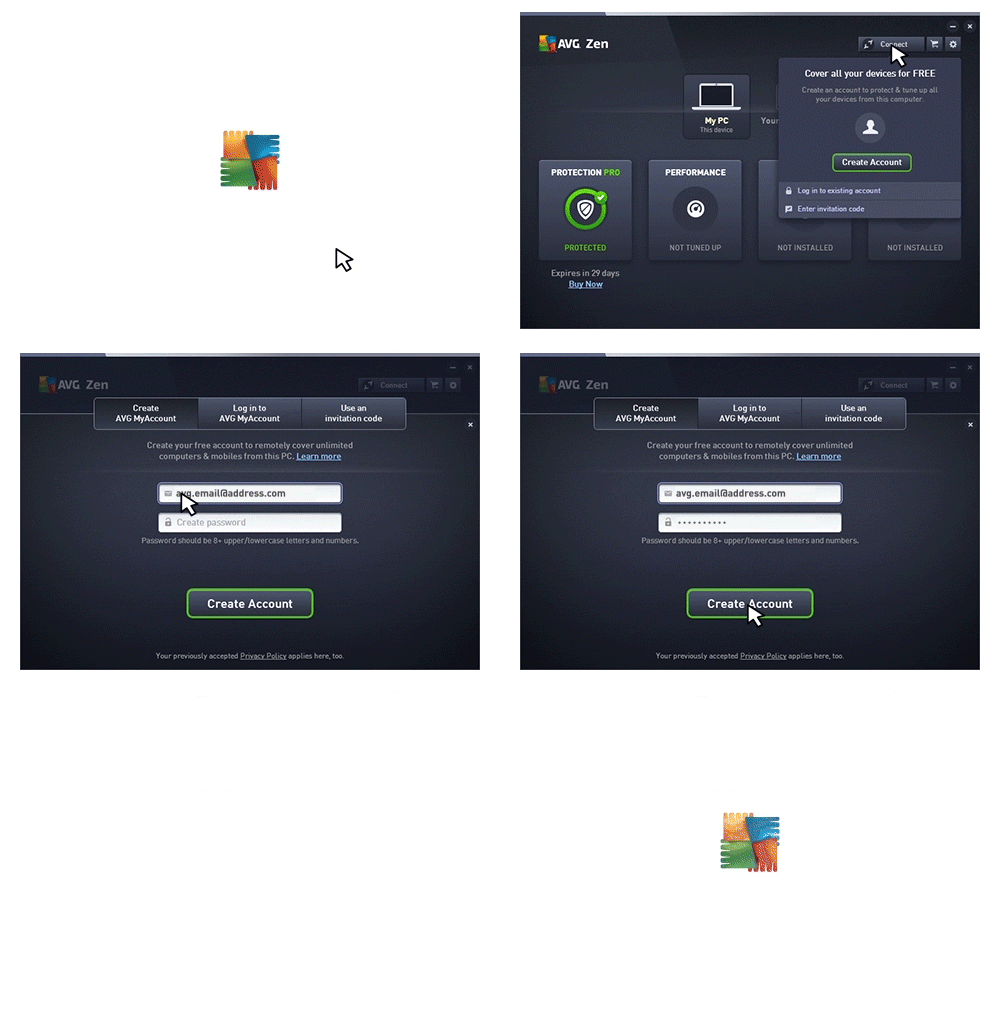
How to create your AVG MyAccount:
- Open AVG by double-clicking your desktop icon
- Click the Connect button, select Create Account
- Enter your email address and choose a secure password
- Click Create Account
You can access your AVG MyAccount at myaccount.avg.com, and connect devices to your network by logging in with these details from any AVG product.
Check out more AVG protection tips

Overview & first steps
