What are Amazon scams and how do they work?
Amazon scams are fraud schemes where criminals pretend to be Amazon (or abuse the Amazon platform) to steal money, trick you into revealing personal information, or take over your accounts. Such criminals could spoof phone numbers, create look-alike websites, or send phishing emails to make you think you are really communicating with Amazon, when in fact, you’re falling for a scam.
Many people think they wouldn’t fall for a scam, but if you use Amazon in any way, you’re at risk. Fraudsters can urge you to take action quickly or face serious consequences, making you fear not doing as they say.
When stressed, panicked, tired, or simply distracted, victims often act differently than they usually would. For example, Charlotte Cowles, a financial advice columnist for The Cut, thought she would have known better. Yet, she handed $50,000 over to fraudsters as part of an Amazon scam that included a man who impersonated the FTC.
You can help protect yourself from Amazon scams by learning the red flags — read up on what the most common Amazon scams are and how to avoid them. Remember that thinking critically, taking a moment to pause, and educating yourself are all important steps in protecting yourself from scams.
Common types of Amazon scams
Phishing, quishing, spoofing and typosquatting are just a few examples of types of Amazons scams to know and avoid. While some fraud schemes take place on the real Amazon website — in the form of third-party sellers who manage to slip past Amazon’s guardrails — many take place off-platform, with scammers impersonating Amazon with fake websites, emails, and scam phone calls.
Scammers may tell you there are business accounts in your name that you didn’t create or high-value orders you didn’t place. But it all comes back to getting your money, account details, or sensitive information. Let’s dig into some common types of Amazon scams.
Phishing and fake email scams
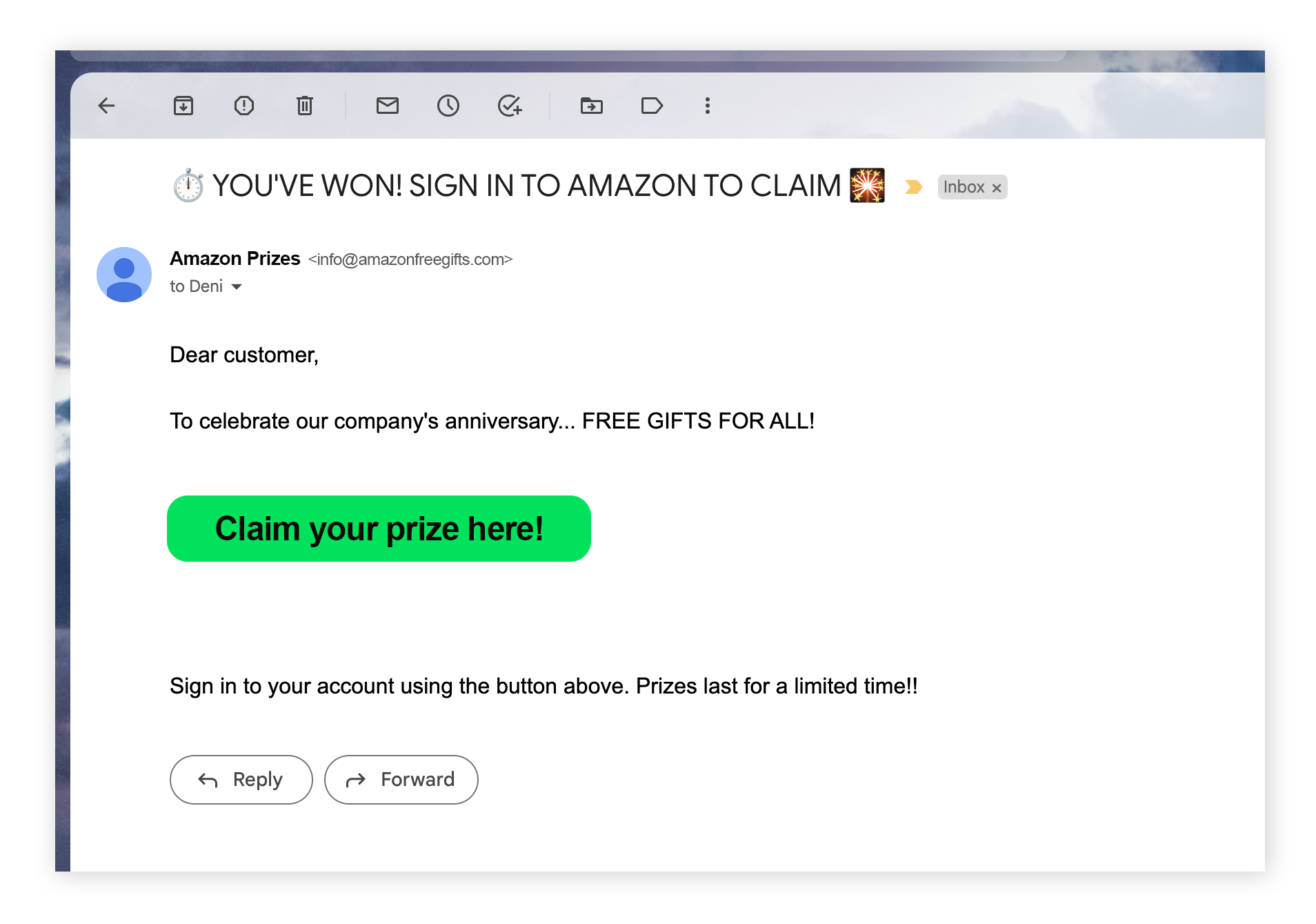
Fake email scams, also called phishing, are one of the most common ways fraudsters steal personal information, account access, and money. Scammers send you a fake email that looks like it’s from a trusted company, like Amazon. It could be about an order you didn’t make, an Amazon Prime membership renewal, or another issue (such as Kindle, Audible, or other Amazon product account problem).
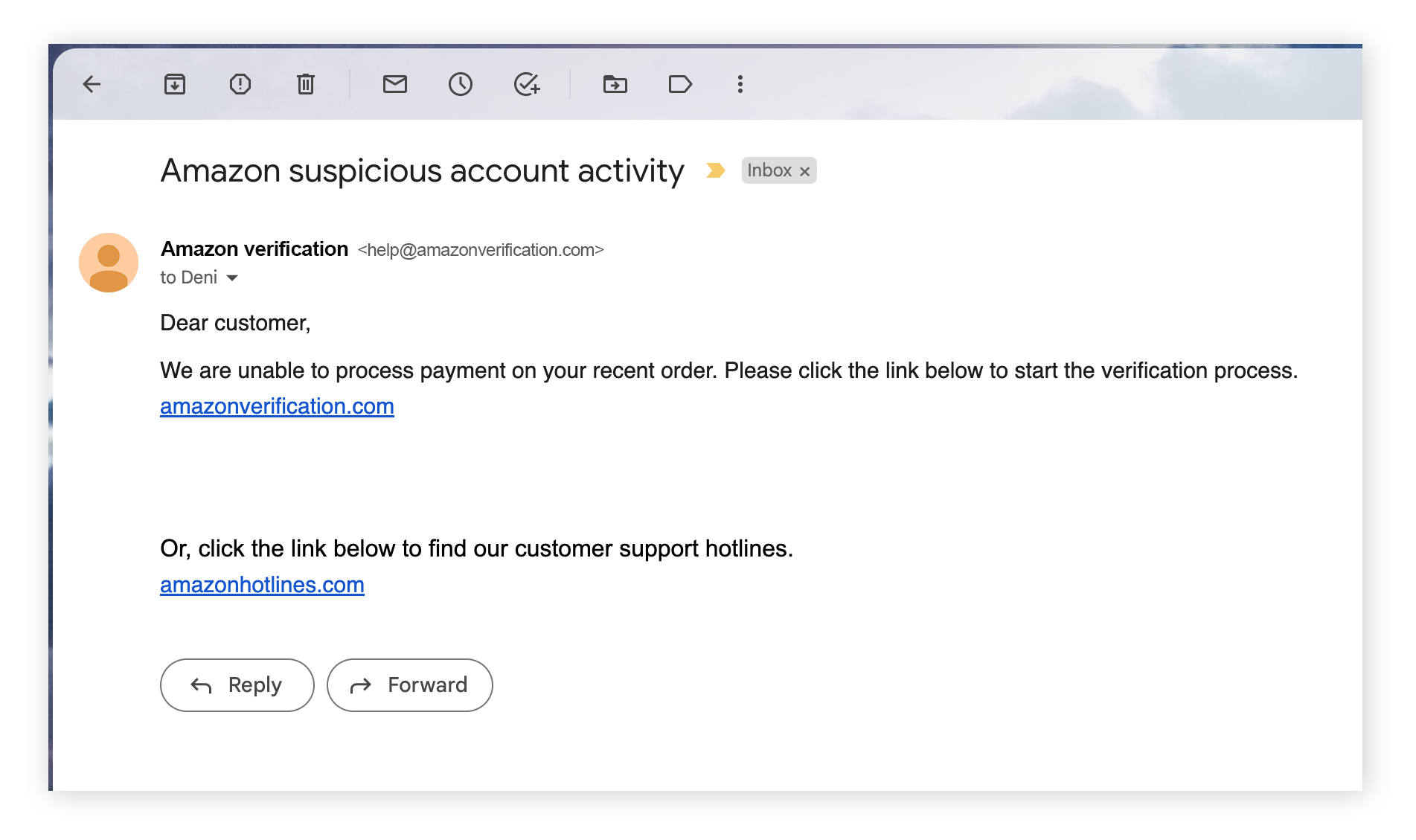
Phishing emails usually contain a dangerous link prompting you to enter personal details, account login credentials, or credit card information. Of course, phishing is not limited to just emails. Scammers can also send you a scam text message with a malicious link in it. Don’t click links in any suspicious communication, whether it’s an email, text, or social media direct message.
Here are some good ways to spot a phishing message:
-
Domains or email addresses that don’t match Amazon: Look carefully at the email address. Is a character different from Amazon’s regular domain? Then it’s not Amazon. Emails from Amazon will always include “amazon” in the email domain name (the part after @). Legitimate email domains include @amazon.com, @amazon.co.uk, @amazon.fr, or @amazon.de, depending on where you live. If you see “amazon” in the first part of the email address, but the domain is generic — as in urgent-amazon-alert@gmail.com — it’s a phishing scam.
-
Suspicious links, or links that don’t lead to the Amazon site: Examine (but avoid clicking) the links in an email by hovering your mouse over them (on desktop) or tapping-and-holding (on mobile). Suspicious links may include character differences with Amazon’s actual website address.
-
Links that are actually IP addresses: IP addresses have numbers before the website domain. If it’s an IP address, it’s not a real Amazon link.
-
Poor grammar or typos in the email: Phishing emails often contain grammar mistakes or typos. And while AI has made these errors less common, scammers may still include them on purpose to weed out people who are paying close attention.

The bottom line
If you receive email communication that says it is from Amazon, log into your account on
amazon.com and navigate to
Amazon’s Message Center to verify it.
All email communication from Amazon is recorded there, so if you don’t see the message in the message center, it’s not real.
Phone scams
Scammers can call you pretending to be an Amazon representative with the goal of getting access to your account or your personal information. This is called a vishing scam. They may urge you to act quickly, claiming that there is suspicious activity on your account or that your account will be suspended without action.
Treat any such phone call carefully. Don’t give your personal data or make payments by phone. Sometimes, someone from Amazon can call you (though it’s uncommon), but Amazon will never ask you for personal information, payments, or passwords by phone.
If someone claiming they are from Amazon calls you, look for these warning signs that it’s a scam:
-
Calls requesting personal details: Amazon will not call you asking for your personal details, account login information, credit card details, OTP codes, or other sensitive details.
-
Requests for gift card details: Scammers may want access to your Amazon gift card balance as gift card transactions can be hard to trace. Never give out Amazon gift card details to unknown requestors by phone.
-
Unexpected refunds: Sometimes, scammers say they’ll give you an unexpected refund for something you didn’t buy. Recognize that this is a scam and don’t give away any of your personal details.
-
Urgency in the request: If someone calls you and presses you to act quickly before your account is frozen, hang up the phone and log in to your Amazon account to check for official communications.
-
Phone numbers that don’t match: Check if the number exactly matches Amazon’s official contacts. Be careful though. Scammers can spoof Caller ID and make it look like Amazon is calling.
The bottom line
Amazon will never call and ask for your OTP codes, credit card details, or other sensitive information over the phone. If someone calls and asks for this, hang up. You can find all legitimate messages from Amazon in their Message Center — use this as your primary way to communicate with Amazon.
Smishing and delivery scams
Smishing is phishing that happens over SMS text messages. In Amazon smishing scams, fraudsters often send texts claiming there’s a problem with a delivery, a delayed package, or a suspicious order on your account. These messages often include a link that looks legitimate urging you to “track your package” or “confirm delivery details.”
When you click the link, you may be taken to a fake website designed to steal your personal information or install malware on your device. Watch out for these warning signs of Amazon smishing and delivery scams:
-
Unexpected delivery messages: If you receive a text about a package you weren’t expecting, be cautious.
-
Urgent requests to act: Messages that pressure you to act quickly to avoid losing a package or having your account charged are a red flag.
-
Suspicious links: Scam texts often contain shortened URLs or links that don’t lead to Amazon’s official website.
-
Requests for personal information: Amazon will never ask you to provide passwords, OTP codes, or payment details via text message.
The bottom line
Don’t click links in unexpected delivery texts. Instead, open the Amazon app or type
amazon.com directly into your browser and check your orders there. If the message isn’t reflected in your account, it’s likely a scam.
Gift card scams
Gift card scams are a common way for fraudsters to financially gain from their victims. They can take many shapes. Someone claiming to be from Amazon tech support might call you and say you need to buy a gift card to unfreeze your account. Or it may be a fake job offer that requires you to buy a “starter pack” with a gift card to work at Amazon.
It can even be a blackmail or sextortion scheme where criminals threaten to release your sensitive information if you don’t buy them an Amazon gift card.
It all comes down to the scammer asking you to buy the gift card and then share the gift card code with them (sometimes by taking a picture). Once they have this, they spend the gift card themselves. This is highly effective because gift card transactions are difficult to trace, and scammers can buy just about anything they want with them.
These scams have a few common hallmarks. Here’s what to look out for:
-
Any request for payment by gift card: This is a highly popular way for scammers to get your money and vanish without a trace. Be wary of anyone asking for payment this way.
-
Threats or emotional manipulation: Scammers will have a story to tell. Any claim that something bad will happen, like your account will be shut down, if you don’t buy a gift card quickly is probably a scam.
-
Listings that ask you to pay by gift card: Be cautious of listings or sellers that ask you to pay exclusively using gift cards outside Amazon’s checkout systems. All legitimate Amazon purchases are completed through Amazon’s checkout system.
The bottom line
Guard your Amazon gift card codes carefully, and be wary of anyone who asks you to pay for a service via Amazon gift card. If you’re a victim of Amazon gift card fraud, contact the
Amazon Customer Protection Review team.
Fake websites and typosquatting
Some Amazon scammers build fake websites that resemble Amazon in order to fool victims into entering their payment details. The website will look like Amazon’s and have a similar URL, but there will be a mistake somewhere in it. For example, it might be amazoon.com instead of amazon.com. This practice is called typosquatting.
Look for these warning signs of a fake Amazon website:
-
Misspelled or otherwise suspicious URLs: The URL could have a typo or otherwise not match Amazon’s official website.
-
Missing HTTPS padlock icon: The legitimate Amazon site will feature a small padlock when you click on the site information icon to the left of the address bar. The padlock means the website uses https rather than the less secure http encryption protocol (note the missing “s” in the latter).
-
Unrealistic prices or mismatched reviews: For example, a brand new Kindle for just $10 is too good to be true. If the website is full of hard-to-believe prices or reviews that don’t match the products, it’s probably fake.
The bottom line
Always check the URL of an Amazon website to make sure it matches what you expect, and look for the padlock icon in your browser’s address bar. When in doubt, navigate there yourself. And always check that the reviews make sense and the listings on the site don’t seem too good to be true.
QR-code scams and brushing scams
Did you get an unexpected package allegedly from Amazon? The package has no return address — just a prominent QR code with a note instructing you to scan it to find out who it’s from. In early 2025, the FTC issued a warning to consumers not to scan such QR codes, as this could be a quishing (QR code phishing) scam. When you scan the QR code of the unexpected package, it might take you to a phishing website. If you enter your details there, you’re delivering them right into the hands of the scammers.
This is a new, more dangerous version of brushing scams, in which phony sellers on Amazon send unsolicited packages to boost their verified reviews. Using a fake Amazon account, they send a package to a random address, then write themselves a glowing product review.
To avoid QR-code package scams, look for these warning signs:
-
Unexpected packages: Be careful of any package you receive unexpectedly, especially one with no sender information.Don’t scan any QR codes or labels attached to the outside, and never send the package to another location if someone contacts you about doing so.
-
QR Codes that link to unknown websites: If a mystery package has a QR code, don’t scan it, and certainly don’t enter personal information into the website it takes you to.
The bottom line
If you receive an unexpected package, do not scan any QR codes that came with it. In fact, never scan any random QR codes — they can lead to scam websites or even install malware directly onto your device. As for the package, the law says you can keep the contents if it was sent to you, but never send the package to a second location.
Scam listings on Amazon
Not all Amazon scams happen off-platform. Some occur directly on Amazon through fraudulent third-party seller listings. While Amazon works to remove bad actors, scammers slip through. For example, one study by a consumer advocate association indicated that counterfeit cosmetics are surprisingly common on Amazon.
Scam listings may advertise popular or high-demand items at unusually low prices, only for the product to never arrive, arrive damaged, be completely different from what was advertised, or be a counterfeit good. In other cases, sellers may attempt to move the transaction off Amazon to avoid detection.
Common warning signs of scam listings include:
-
Prices that are too good to be true: Extremely low prices on in-demand products are often a red flag.
-
Requests to communicate or pay outside Amazon: Any seller asking you to email them directly or pay outside Amazon’s checkout system is likely scamming you.
-
Poor or mismatched reviews: Reviews that don’t match the product description, appear copied, or just seem generically enthusiastic are warning signs.
-
Recently created seller accounts: Treat new sellers with little or no feedback cautiously, especially for expensive items.
The bottom line
Always complete purchases through Amazon’s checkout system and avoid sellers who ask to move communication, especially payment, off the platform. Check seller ratings, read reviews carefully, and report suspicious listings to Amazon to help protect yourself and others.
How to protect yourself against Amazon scams
Online retail is quick and convenient, but it’s important to take steps to protect yourself and avoid scams when shopping online. This is true for both Amazon and any other e-commerce website. Protect yourself and avoid common Amazon scams (or scams from websites pretending to be Amazon) by following these tips:
-
Always use the official Amazon website: Only use Amazon’s official website for communication, purchases, and making payments. Check the URL on the website you use to make sure it’s legitimate.
-
Enable two-factor authentication (2FA): Amazon accounts can get hacked if you don’t take precautions. Enable 2FA on your account, and always use a strong, long, and unique password.
-
Don’t click random links: If you get unsolicited communication in an email or text ostensibly from Amazon, avoid clicking on the link. Visit Amazon’s message center on their official website instead to view all legitimate communication.
-
Monitor your Amazon account: Keep an eye on your account activity, such as reviews, order history, and logged in devices for any unauthorized activity.
What to do if you fall for an Amazon scam
If you fell for an Amazon scam, review your account activity and logged in devices, change your password, contact Amazon, and report the scam. If you disclosed personal information to a scammer, be on the lookout for more scammy communications, monitor your accounts across the internet for account takeover attempts, and watch for signs of identity theft.
Here’s a step-by-step action plan if you fall for an Amazon scam:
-
Review your Amazon account information: If you still have access, check to see if your associated contact information, such as phone number or email address, have changed. If they have, change them back and remove the unknown contacts. Check your login history for any devices that aren’t yours, too.
-
Change your Amazon password: Immediately change your Amazon password to a new one unrelated to your last. If you’re feeling uninspired, use a random password generator. Then, set up two-factor authentication on your account.
-
Check your recent orders: Check your order history and cancel any unauthorized transactions. If it’s too late to cancel them, initiate a chargeback with your bank.
-
Contact your bank or card provider: Report any possible fraud to your bank, then freeze and replace your card if you disclosed your payment details to a scammer.
-
Report the scam to Amazon: Amazon wants to know about scams in their name. If you see a scam or fall victim to it, report it right away to amazon.com/reportascam.
-
Monitor your credit reports: If scammers get your sensitive information, like your Social Security number, they may use it to open credit in your name or commit other forms of identity theft. Keep an eye on your credit reports if you fell for a scam, and consider putting a fraud alert on it. You should also report identity theft if you have concrete proof.
-
Be prepared for more scams: Once you’ve been scammed once, scammers may see an opportunity to strike again — or they may leak your personal information on the dark web for other scammers to take advantage of. Falling for one scam may set into motion an uptick in spam, scams, and phishing attacks.
Stay safer against costly Amazon scams
One of the best ways to stay safer against Amazon scams is to know when you’re being targeted. Recognizing the red flags is a good first step, but some phishing attacks are so convincing, even the scam-savviest among us might fall for them — especially when stressed, distracted or tired. Free AI-powered scam protection from AVG steps in when your guard is down.
To help detect phishing, block malicious websites, and stop malware, install AVG Antivirus Free and shop online with more peace of mind.
FAQs
How can I tell if a seller on Amazon is legitimate?
There are a few steps you can take to help verify the legitimacy of a seller on Amazon. First, check who’s fulfilling the order. If it comes directly from Amazon, it’s almost certainly legitimate. For third-party sellers, see if it is “fulfilled by Amazon.” This means the product is processed at the Amazon warehouse, and Amazon is responsible for all customer service.
For other third-party sellers, check reviews of the product and the seller. Positive reviews, and attentiveness from the seller to any negative reviews, are good signs that the seller is legitimate.
What should I do if I receive an unexpected refund or payment message from Amazon?
Always communicate with Amazon through the message center on their official website. Do not click any links or reply to any text or email communication directly. Log into your Amazon account to verify that a refund was issued in your order history. If it was, and you do not think you are owed this refund, contact Amazon Customer Service directly. Never answer requests to pay back a mistaken refund, especially if the requests come from off-platform.
Can scammers access my Amazon account if I just clicked a link?
It is possible for scammers to get into your Amazon and other accounts if you click a suspicious link, as these links may initiate malware downloads that install keyloggers on your device. If you click a scam link, take some timely steps for damage control. First, turn off the internet and check for any files that you might have downloaded when you clicked the link and delete them. Then run a free antivirus scan to make sure your entire system is safe.
Next, change your password on Amazon and other sensitive sites where you might have reused your Amazon password.
Can I get my money back if I was scammed outside Amazon’s platform?
If you’re scammed by the third-party seller, report it to Amazon. You may be able to get your money back under their A-to-Z guarantee, which covers third-party sellers. Never send payment or details to sellers off the Amazon platform, as this makes it much harder to secure a refund if you’re defrauded. If you get scammed off the platform, your best bet is to report the fraudulent charges to your bank or credit card provider.



.png)
.png)