With 138 million daily active users in 2026, Roblox is a huge and constantly evolving online world. Much of what children experience is created by other users, which means the content they encounter — and the people they interact with — can vary significantly from one game or experience to the next.
That variety is a big part of Roblox’s appeal, but it also makes assessing the platform’s safety risks more complicated. Before looking at those risks in detail, it helps to understand exactly what Roblox is, how it works, and what children can do on the platform.
What is Roblox?
Roblox is an online gaming platform where users can explore millions of interactive, user-created experiences, from obstacle courses and racing games to role-playing adventures and virtual worlds. Players customize their avatars, play with friends, and create their own games using Roblox Studio. The platform also supports social interaction through chat, which requires an age check, with communication features restricted according to users' ages.
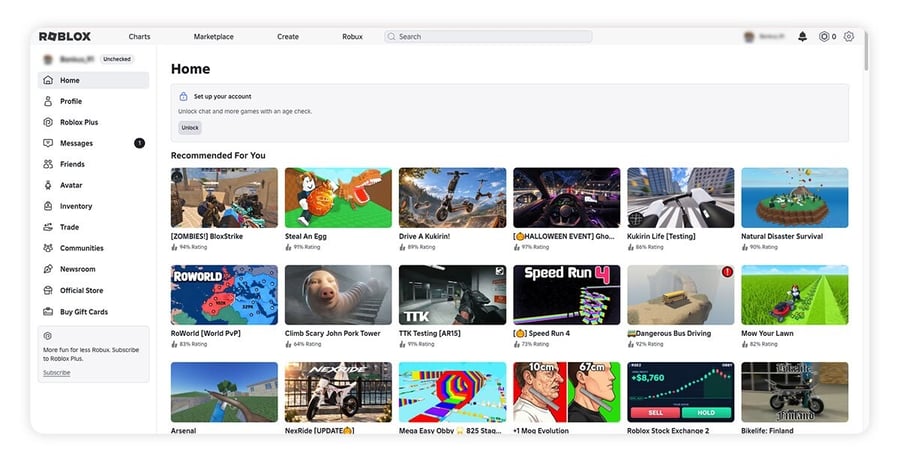
The Entertainment Software Rating Board (ESRB) rates Roblox T for Teen. Its August 2025 parents’ guide lists the content descriptor Diverse Content: Discretion Advised, alongside two interactive elements: Users Interact and In-Game Purchases (Includes Random Items). The ESRB also notes that because Roblox hosts a vast range of user-created experiences, some may be inappropriate for younger children.
Roblox also has its own virtual currency, Robux, which players can purchase with real money or earn by selling avatar items or monetizing the games they create. While eligible creators aged 13 and older can exchange earned Robux for real money through Roblox’s Developer Exchange (DevEx) program, purchased Robux cannot be cashed out.
So, is Roblox safe for kids?
Roblox isn’t risk-free for kids, but its age-based safety features and parental controls can help reduce potential dangers. Since June 2026, the platform has offered two account experiences designed for younger users: Roblox Kids (ages 5 to 8) and Roblox Select (ages 9 to 15). These provide age-appropriate protections, while parents can manage additional restrictions by verifying their adult status and linking their account to their child's.
However, safety concerns remain, with Roblox facing multiple lawsuits concerning child safety and its handling of potentially harmful interactions. Parental controls alone can't eliminate every risk — regular conversations about what your child plays, who they interact with, and how to report uncomfortable experiences are equally important.
Below, we’ll explore the main safety concerns, explain how Roblox’s age-based accounts work, and show you how to set up parental controls.
What are the main risks parents should know about?
Like other online platforms such as Discord, Minecraft, and YouTube, where kids can interact with strangers, Roblox presents potential safety risks. In addition to exposure to inappropriate content and online predators, top concerns include bullying, unwanted purchases, and privacy issues.
Here are the main risks parents should be aware of:
 Inappropriate content: Despite maturity labels, some content can slip past moderation. In April 2025, before Roblox required age checks for chat, Revealing Reality reported that sexualized spaces on Roblox were accessible to test accounts registered as children under 9.
Interacting with strangers online: Children who can communicate with unfamiliar users may encounter predators attempting to groom them or criminals trying to scam them. Teach your child to treat requests to move conversations to another app as a warning sign and to tell you if someone makes them uncomfortable.
Bullying and toxic behavior: Multiplayer games and social interactions can expose children to bullying, abusive language, or other harmful behavior.
In-game purchases: Kids may feel pressure to spend Robux to keep up with friends, or accidentally make purchases using real money. Some experiences also offer paid random rewards, such as mystery boxes or prize wheels. The ESRB flags these as In-Game Purchases (Includes Random Items), and Roblox requires creators to show the odds of each possible reward before a purchase.
Data privacy concerns: Roblox's age verification options include Facial Age Estimation, which analyzes images or video of a user's face. Roblox states that its verification provider, Persona, deletes these images and videos immediately after processing. Under its latest privacy policy, users under 13 receive stronger default privacy protections, and personalized advertising is disabled for users under 18. To help protect your child's account from hackers, enable 2-Step Verification.
Organized crime: Some predators belong to organized networks targeting children across multiple platforms. In one case involving the extremist network "764," an FBI affidavit alleged that a predator contacted a child on Roblox before moving to Discord. He was sentenced to 30 years in prison in June 2026 for child sexual exploitation and cyberstalking, highlighting the risks of moving conversations off-platform.
These risks don't mean every child will encounter harmful content or interactions on Roblox. However, understanding the potential dangers can help parents recognize warning signs and put appropriate safeguards in place.
Roblox safety controversies
Roblox is facing multiple lawsuits alleging that predators used the platform to target and groom children. In December 2025, a panel of federal judges centralized 31 of these federal cases for pretrial proceedings in the Northern District of California as MDL No. 3166. The panel noted that the cases share common questions, including “whether Roblox made false representations that Roblox is safe for children to use.” In its latest quarterly filing, Roblox says it intends to defend itself vigorously.
State and local governments have also taken legal action. As of October 29, 2026, 10 U.S. states and two California counties had sued Roblox over child safety concerns. Courts in Texas, Tennessee, and Los Angeles County have allowed certain claims to proceed, although these decisions don't establish liability.
Roblox has also reached settlements with six states. In April 2026, West Virginia announced an $11.08 million settlement requiring additional protections, including age verification, restrictions on adult-to-child communication, and safer default content settings for users under 16.
Meanwhile, regulatory scrutiny continues. In October 2026, the Federal Trade Commission (FTC) and the states of Pennsylvania and Utah notified Roblox that they were considering potential claims, including violations of the Children’s Online Privacy Protection Act (COPPA). Separately, an ongoing class action dating from 2023, Colvin v. Roblox, alleges that minors used third-party virtual casino sites to gamble Robux.
Independent research has raised additional concerns. In April 2025, UK research agency Revealing Reality found that adult accounts could connect and interact with accounts registered to children. When researchers revisited the platform in September 2025, they found that adults could still enter spaces intended for younger users, despite some inappropriate experiences being restricted to users aged 17 and older.
Roblox has since made changes in response. In January 2026, it began requiring users worldwide to complete an age check before they can chat, and in June 2026, it made Roblox Kids and Roblox Select accounts available globally.
How Roblox sets protections by age
Roblox uses age-based accounts to determine which games children can access, who they can communicate with, and which safety settings parents can manage. Account restrictions vary slightly by region and are based on your child’s verified age, established through an age check or parental verification. If your child’s age is incorrect, you can request a correction.
Roblox Kids (ages 5 to 8)
Roblox Kids accounts can only play games with a Minimal or Mild content maturity label. By default, Roblox also excludes games that feature sensitive issues, social hangouts, or free-form drawing.
Chat is disabled by default, including chat outside games. Parents can enable in-game chat and one-on-one chat with age-appropriate users or trusted friends. With chat on, Kids users can communicate with users ages 5 to 12 and approved trusted friends.
Roblox Select (ages 9 to 15)
Roblox Select offers older children access to games rated up to Moderate by default, with additional restrictions that vary by age. Parents of children ages 9 to 12 can choose to lower the maximum permitted content rating.
Here’s how communication settings depend on age:
-
Ages 9-12: Chat outside games is limited to trusted friends. Parents can disable chat entirely.
-
Ages 13-15: Users can chat outside games with friends in a similar age group and communicate with users ages 9-17, subject to applicable restrictions.
-
One-on-one in-game chat: Disabled by default, but parents can enable it for age-appropriate users and trusted friends.
-
Voice chat: Unavailable to users ages 9-12. For users ages 13-15, in-game voice chat is disabled by default but can be enabled by parents in supported regions.
In most regions, parents can manage their child’s settings through age 12. Certain controls, including game approvals, game blocking, and one-on-one chat permissions, remain available through age 15.
At age 16, users transition to a standard Roblox account. Roblox has stated that once its age-verification rollout is complete, users will need to complete an age check to access standard account features.
Content maturity labels
Roblox assigns games content maturity labels based on questionnaires completed by their creator. These ratings help determine which experiences users can access based on their age and account settings.
As of October 2026, Roblox’s help center describes four content maturity levels:
-
Minimal: May contain occasional mild violence, light unrealistic blood, or occasional mild fear.
-
Mild: May contain repeated mild violence, heavy unrealistic blood, mild crude humor, or repeated mild fear.
-
Moderate: May contain repeated moderate violence, light realistic blood, moderate crude humor, unplayable gambling content, or moderate fear.
-
Restricted: May contain strong violence, heavy realistic blood, romantic themes, unplayable gambling content, alcohol, strong language, social hangouts and private spaces, or extended AI interactions. These experiences are limited to age-verified users aged 18 and older.
Users aged 16 and 17 with standard accounts can generally access rated experiences up to Moderate, but not Restricted content. Roblox also announced plans in June 2026 to transition to ratings from the International Age Rating Coalition (IARC) later in the year, which may affect how content ratings are displayed across regions.
How to keep your child safer on Roblox
Keeping your child safer on Roblox starts with staying involved in their online activities, teaching good digital habits, and using age-appropriate parental controls. Regular conversations about what they play and who they interact with can help you identify potential risks before they become serious problems.
Teach your kids how to stay safe online, including why they should never share personal information with strangers and how to block and report users who behave inappropriately. Encourage good netiquette and privacy habits, such as using strong passwords and avoiding suspicious links that could be phishing attacks leading to malware.
Playing Roblox together can also help you understand the games your child enjoys, observe how they interact with others, and create opportunities to discuss online safety. Alongside these conversations, review Roblox's age-based protections and configure the parental controls below to help limit inappropriate content, manage communication, and monitor your child's activity.
Parental controls on Roblox
To help make your child’s Roblox experience safer, you can set up parental controls. You don’t need your own Roblox account to start. With Roblox’s Parent mode, you can verify that you’re an adult on your child’s device and manage their settings there. Roblox updates these menus periodically, and the exact options can vary by region and device.
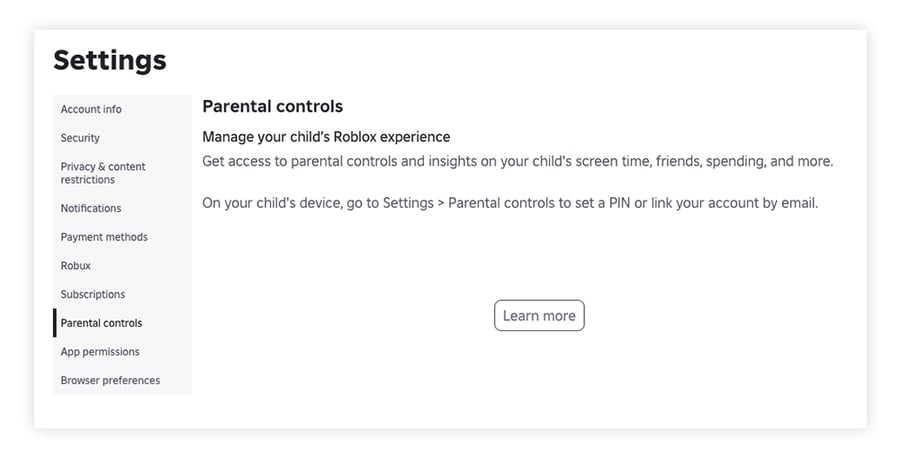 Here’s how to set it up from your child’s account:
-
Go to Settings by clicking the gear icon in the top-right corner on a desktop device. On mobile, select More at the bottom right, then Settings.
-
Select Parental controls > Ask a parent on this device > Continue as a parent.
-
Verify that you’re an adult using facial age estimation or a government ID. In some regions, Roblox also accepts a credit card.
-
Confirm your child’s birthday. This determines which age-based protections apply, so make sure the date is accurate before confirming it.
-
Create a 6-digit Parent PIN. You’ll use it to approve your child’s requests later without repeating the age-verification process.
Roblox will then offer to send you an email to set up your own parent account. It’s optional, but it lets you receive updates about your child’s screen time, friends, and spending, and manage their settings from your own device.
After setup, go to Settings > Parental controls on your child’s account (or select your child in your own account, if you created one). Under Settings you manage, you can:
-
Set a content maturity level: Go to Content restrictions > Content maturity and adjust the slider.
-
Block a game: Go to Content restrictions > Blocked games, select the + icon, and search for the game.
-
Approve a game request: When your child asks to play a game outside their default catalog, you can approve it with your Parent PIN. Games you approve appear under Content restrictions > Allowed games.
In most regions, you can manage all of these settings until your child turns 13. Game management and one-on-one chat controls continue through age 15. As your child matures, review their parental control settings every 6 to 12 months. Keep talking about inappropriate content and how to stay safe online, so they’re ready to navigate online spaces more independently as they mature.
Managing communication and social interactions
A major risk for kids online is interacting with strangers, including adults who may attempt to exploit or manipulate them. Once your child has completed an age check, you can manage their available communication settings on Roblox. Go to Settings > Parental controls > Settings you manage > Communication.
Depending on your child’s age and account settings, options may include:
-
Experience chat: Controls for chatting with other players within Roblox experiences.
-
Chat and party with friends: Controls for direct chats and group communication with eligible friends or connections.
-
Live collaboration in Studio and Gameplay coordination: Manage certain communication features used when creating or playing games.
You can also manage the users your child has blocked under Settings you manage > Blocked users. Go over blocking and reporting with your child so they can do it themselves. Depending on their age, also teach them about social engineering to help them spot groomers and scammers.
Spending and screen time limits
You may also want to limit your child’s spending and screen time. Keeping an eye on in-game purchases helps you track how much your child spends, whether the money comes from an allowance or a payment method linked to their account.
To set a monthly spending limit, go to Settings > Parental controls > Settings you manage > Spending restrictions > Monthly spending limit, enter an amount, and select Update. In most regions, spending limits are available for children under 13 and don’t apply to gift card redemptions. You can also turn on notifications about your child’s spending where supported.
To set a daily screen time limit:
-
Go to Settings > Parental controls.
-
Under Screen time, select Manage.
-
Choose a time from the Daily limit dropdown and save your changes.
Protect your kids while they play Roblox
Online risks don’t stop at Roblox. While parental controls and open conversations are essential, an extra layer of protection can guard your child’s device against unsafe links, malicious downloads, and scam websites. AVG AntiVirus FREE provides real-time protection and helps defend against phishing attacks while your kids explore, play, and connect online.
FAQs
How do I set parental controls on Roblox?
To set up parental controls on Roblox, open Parental controls in your child’s account settings and choose Ask a parent on this device. You’ll verify that you’re an adult, confirm your child’s birthday, and create a Parent PIN. We cover the steps for setting up Parental controls on Roblox above. After that, you can manage your child’s content maturity level, chat settings, spending and screen time limits, and which games they can play.
What are the Roblox age ratings?
Roblox labels each game with one of four content maturity labels: Minimal, Mild, Moderate, or Restricted. Roblox Kids accounts (ages 5 to 8) can play Minimal and Mild games, Roblox Select accounts (ages 9 to 15) can play games up to Moderate, and Restricted games are only intended for age-verified adults. The ESRB rates the Roblox platform itself T for Teen.
Why is Roblox bad for kids?
Roblox isn’t inherently harmful to children, but it does carry risks. These include inappropriate content, contact with strangers who may try to groom or scam children, and pressure to spend money. Roblox also faces lawsuits and government actions over child safety, which we cover in the controversies section above. You can help manage these risks with an accurate age check, the right parental control settings, and regular conversations with your child about staying safe online.