What is Discord?
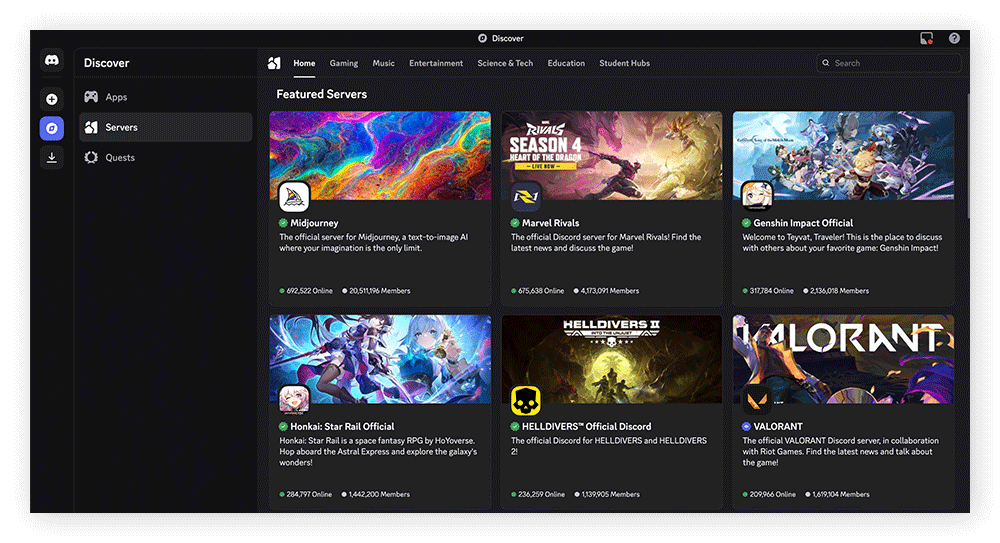
Discord is a free online platform designed for communities that want a versatile space to connect and collaborate. Anyone can create a custom server, which contains text, voice, and video channels. Channel creation depends on admin permissions, giving server owners control over how their community is structured.
Servers can be organized into categories with multiple channels and enhanced with custom bots, stickers, and emojis. Beyond servers, users can also send direct messages, start calls, or create group chats with up to 10 members.
Originally built for gamers, Discord remains popular for in-game voice chat but has grown far beyond its roots. Its invite-only system gives communities controlled access and a club-like feel, making it a go-to platform for people seeking unique, engaging online spaces.
Overview of Discord’s features and popularity
Discord’s popularity stems from allowing niche communities to create and manage their own virtual servers, and foster connections in a place that feels like home. Along with text, voice, and video chat, Discord lets you share files, livestream, direct message, and screen share — ideal for streaming watch parties or real-time collaboration.
Discord servers can be customized with features that make interactions more organized, dynamic, and engaging, including:
-
Channel categories to group related discussions
-
Role assignments and permissions to control access
-
Server boosts that members can contribute to unlock perks
-
Custom emojis, stickers, profiles, usernames, and avatars
-
Moderation bots to help keep communities safe
-
Engagement bots such as MEE6 that add experience points, levels, ranks, and rewards based on chat activity
Potential risks of using Discord
Like any online meeting place, Discord comes with risks such as scammers, hackers, malware, and data exposure. Its younger user base makes it an attractive target for bad actors, while its reputation as a friendly community hub can give users a false sense of security. Because moderation is largely left to individual servers, harmful or explicit content may also slip through more easily.
The pros and cons of video chat apps also apply to Discord, as video chatting is a core feature. But how secure is Discord in general compared to other sites, and can joining a Discord server be dangerous? Let’s take a closer look.
 Privacy concerns and data collection practices
Discord’s privacy policy states it doesn’t sell user data, but collects certain data like IP addresses, email addresses, device information, message content, and interactions — although some of this is only stored temporarily. The type of data collected could make Discord a target for data breaches.
In August 2023, a third-party company, Discord.io, suffered a data breach affecting around 760,000 members. Although it wasn’t officially affiliated with Discord, the company did provide custom Discord invite links, and the impact was significant enough that the third-party company shut down following the incident.
Note also that, while messages are encrypted in transit, once they reach Discord’s servers, the content is unscrambled. Discord says this is necessary to monitor for harmful or illegal activity and to comply with legal requirements. Because of this, it’s best to treat Discord like a public forum and use secure message apps with end-to-end encryption if you need to share sensitive information.
Discord has also faced privacy concerns over GDPR compliance, particularly around the Right to be Forgotten. When you delete your account, Discord removes your personal data, but not all the messages you’ve posted in servers or channels. That’s because once messages are shared publicly, they’re generally not considered “personal data” under GDPR — a common security and privacy misconception.
That said, the French data authority CNIL has fined Discord for other GDPR violations, highlighting ongoing concerns about how it handles user privacy.
 Malware, phishing, and scams on Discord
Because anyone can generate and share invite links, Discord’s invite system is vulnerable to phishing, malware, and malvertising scams. Scammers often use them to trick users into downloading malicious software or joining compromised servers. In July 2025, hackers even exploited expired Discord invites to redirect people to fake servers.
Other types of scams that rely on social engineering are also common. Many users let their guard down on Discord, assuming it’s a safe community space, which makes them more likely to fall for fraud attempts disguised as friendly interactions.
To help avoid these types of threats on Discord, take care before clicking any links, and bolster your online security with robust cybersecurity software. AVG AntiVirus Free comes with real-time protection to help block malicious sites and links before it’s too late, as well as advanced antivirus scanning to keep malware and hackers at bay.
 Exposure to explicit or harmful content
Discord’s servers are invite-only and moderated by the owner or administrators, not Discord directly. Anyone can join a server as long as they have the link and password, and anyone can receive friend invitations from those in the same server. The lack of oversight and convenient connection can make it easier to run into harmful content and the users behind it.
A stark example of potential dangers on Discord’s “private” servers, Jack Teixeira was arrested for leaking Pentagon documents on a Discord server in 2023. It went largely unnoticed until a member of the group decided to share the material with a larger, public group.
Is Discord safe for kids?
Given its privacy model and limited parental controls, Discord is not the safest platform for children. Weak moderation makes it easier for predators to exploit, while servers can expose kids to cyberbullying, doxxing, and other risks that parents should take seriously:
It’s difficult to say to what extent Discord is less safe for kids than other social platforms, since many cases go unreported. What matters most is learning how to keep your children safe online, no matter which platform they use.
Minimum age requirements and parental controls
The minimum age to use Discord is 13 in many countries, though some local laws may set it higher. Like with many platforms, this requirement can be bypassed by entering false information, but Discord may suspend accounts and take action if it suspects age fraud.
The company has tried to make Discord safe for kids with a feature called Family Center, which allows parents to monitor their child’s activity. Discord Family Center can’t show parents the content of messages or shared media, but you will see friends added, servers joined, and usernames they’ve communicated with.
How to stay safe on Discord
The best way to stay safe on Discord is to modify your privacy and security settings to block direct messages and friend requests from strangers. And, if you want to reduce exposure to sexual or graphic content, enable Discord’s built-in content filters in the settings.
Adjusting privacy and security settings
-
Open Discord, click Settings (the gear icon), and then Content & Social.

-
Under Sensitive content filters, next to Mature Sexual Media, select Blur or Block for each type of message. Do the same for Graphic Media.

-
Scroll down, and under Direct Message spam, select Filter from non-friends.

-
Scroll down further, and under Social permissions, toggle off Direct Messages. Under Friend requests, toggle off friend requests from Everyone and Server members.

Avoiding public servers and unknown links
Malicious links are one of the most common methods cybercriminals use to compromise your security, so avoid clicking suspicious invites or links in chats. Be cautious of unexpected messages or friend requests — they may be attempts to socially engineer you into a scam.
It’s also best to steer clear of servers with open access, where anyone — including hackers — can join. Always verify that a Discord server is legitimate before connecting, and use cybersecurity software that can detect and block online threats.
Protect yourself and your loved ones while using Discord
Stay safer on Discord and beyond with AVG AntiVirus Free. Get real-time protection against malware, phishing, scam links, and malicious sites — plus enhanced security features for worry-free browsing. Download AVG AntiVirus Free today and protect your devices and data with confidence.
FAQs
Does Discord use end-to-end encryption?
Discord only has end-to-end encryption (E2EE) for video and audio messages, using a protocol it has termed DAVE (Discord Audio & Video End-to-End Encryption). Discord does not have E2EE for written messages, since E2EE would not allow Discord to comply with legal obligations, or to step in and remove harmful content reported by users.
How can I protect myself from malware on Discord?
You can protect yourself from malware on Discord with security software like AVG AntiVirus Free, which can help prevent malware from infecting your device. You should also configure your content settings in Discord to only allow direct messages and invitations from friends, to help keep potential cybercriminals at bay.
Is it safe to share documents on Discord?
It’s typically safe to share documents on Discord with those you trust. However, since Discord’s Content Delivery Network (CDN) uses links, shared documents may be accessible to others even after you delete them on your side. Remember, any media or content you share will usually remain wherever you post or share it, even if you request personal data deletion.



.png)
.png)