In most cases, a hacked Facebook account can be recovered. If a hacker steals your password, here’s an overview of the main steps you should take to try and regain access and secure your account:
-
Reset your password (or use Facebook’s account recovery process).
-
Remove any unauthorized devices or permissions.
-
Inform family and friends that your account was compromised.
However, it’s not always that simple, and the steps you need to take will vary depending on how you were hacked and whether your login credentials have already been changed. Keep reading for a more detailed guide to recovering your hacked Facebook account.
How to recover a Facebook account after a hack
If you’ve received a security alert from Facebook claiming that your account has been hacked, it’s best to act quickly. However, it’s important to note that alert emails can be fake or spoofed, so make sure to verify the email is real before proceeding.
If you can still access your Facebook account, go to Profile > Settings & privacy > Settings > Account Center > Password and security > Recent emails to see if Facebook really did send an account security email before proceeding. If you can’t, check that the alert came from an official Facebook email address and that the links it includes all lead to the official facebook.com domain.
Then, assuming you can still access your account, follow these steps to recover your hacked Facebook account. If you can’t access your account, skip to the next section.
1. Review and log out of any suspicious sessions
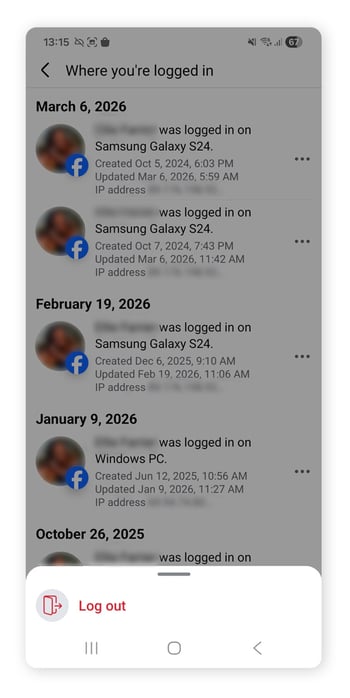
Before anything else, check to see if any devices you don’t recognize are logged into your account. Facebook orders logins based on recency, so look towards the top of the list to spot potential hacking incidents. Here’s how to review the device activity log:
-
Go to Profile > Settings & privacy (the three-dots icon on mobile) > Activity Log.
-
Click on Security and login information > Where you’re logged in to check for unauthorized sign-ins or unrecognized devices.
-
Click the three dots to the right of the login and click log out to end any unauthorized sessions.
2. Review and manage app permissions
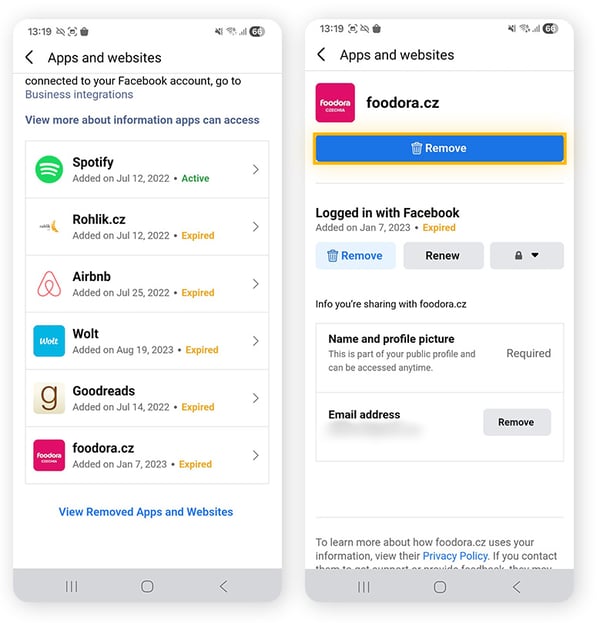
Sometimes, hackers can get access to your Facebook account by first compromising a connected third-party app. So, if you’ve been hacked, check which apps are linked to your Facebook account and remove any that you don’t recognize, trust, or need. You can also change your privacy settings to limit what Facebook data third-party apps can access.
Go to Settings and privacy > Settings > Apps and websites to check which apps and websites have permission to access your Facebook information.
Giving permissions to any third parties you don’t trust could leave your account vulnerable to future hacking attempts. You can remove any suspicious apps or websites by selecting them and tapping Remove.
3. Change your password
A hacker who has your password can log back in even if you have signed them out, so it’s important to change your Facebook password as soon as possible. Choose a new, strong, unique password that can’t be guessed or cracked easily, ideally containing a mix of upper and lower case letters along with numbers and special symbols.
To change your Facebook password, go to Settings and privacy > Accounts Center > Password and security > Change password. And be sure to select the Log out of other devices checkbox if your Facebook account was hacked.
4. Delete hackers' posts and notify friends and family
Once your account is secure, the next step is damage control. Hackers may have spammed your friends and contacts with malicious links, scams, or other potentially dangerous content or phishing attempts. Consider updating your Facebook status to tell your connections that your account was compromised and that any suspicious messages or links they received should be ignored.
Once you’ve let your friends and family know, check through your account and remove any posts or messages you find that contain potentially dangerous links or content.
How to recover a Facebook account if your password has been changed
If your password has been changed without your consent, you might receive an email from Facebook notifying you of the password change. You might also find yourself signed out of your Facebook account and receive a 'You entered an old password' message when you try to log in.
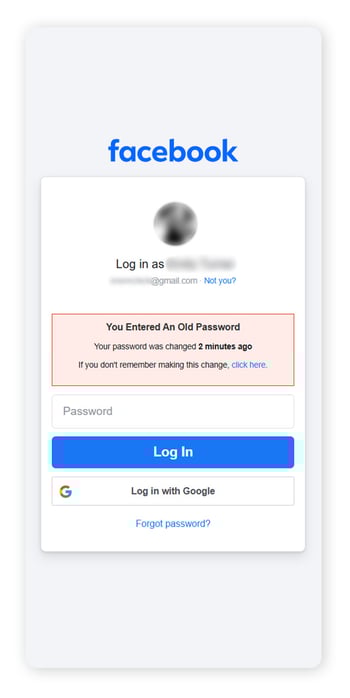
But, if your email address is still connected to your Facebook account, there are some options for recovery:
See if you are still logged in on another device
A hacker who changed your password may not have selected the option to log out of all active sessions, so it’s worth checking if you’re still logged in on any of your devices. Try visiting Facebook on your phone, laptop, or other devices that are usually signed in to see if you still have access. If you do, follow the steps listed above to secure your account.
If the issue with your Facebook account is contained to your phone, it is possible that your phone has been hacked rather than your Facebook account. In this case, you will need to take steps to secure your phone.
Check your email and reset your password
You may already have received an email from Facebook notifying you that your password has been changed. If you did not change your password, you can click the link in the email to reset your password.
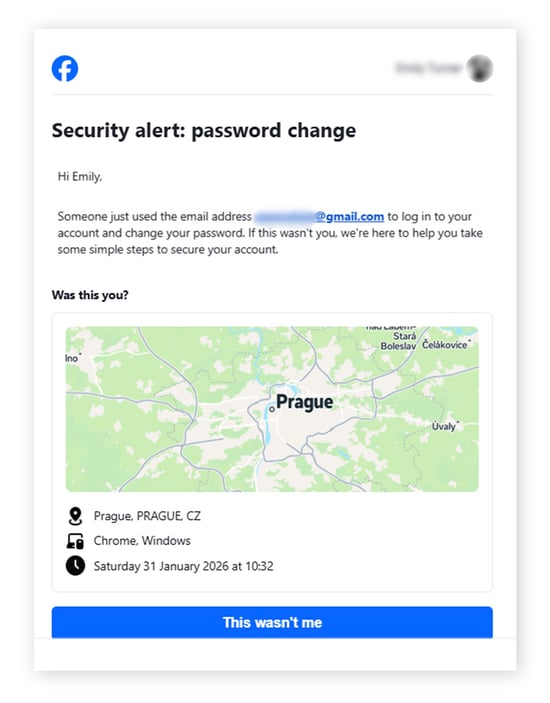
Once you have clicked the link, follow the steps to recover your account and reset your password. And, after changing your password, follow the steps in the How to recover a Facebook account after a hack section to secure your account.
If you’re unable to access your email, it’s possible that the hacker has hacked your email and used this to access your Facebook account. Make sure you take steps to secure your email after it has been hacked.
Reset your password through the login page
If you’ve been logged out on all your devices, but your email account is still linked to your Facebook account, you can go to the Facebook login page and click the ‘Forgotten password?’ button. This will send a special code to your email that will enable you to reset your password and regain account access.
Then follow the steps in the How to recover a Facebook account after a hack section to secure your account.
How to recover a Facebook account if your password and email have been changed
If you’ve lost access to your Facebook account, can no longer sign in, and the email address and password linked to the account have both been changed, it can be challenging to regain access. Depending on what account information the hacker has changed, it may not be possible to recover your account.
Note that prior to 2023, it was possible to use Facebook’s ‘Trusted Contacts’ feature to regain access to your account even if the email address had been changed. But, as of 2023, Facebook no longer supports this function, so any emails or notifications claiming that a Trusted Contact is helping you to regain access to your account by changing their email or password is a scam.
In the worst case scenario that a hacker has changed your email address and password, here are some options to try to regain access to your account:
Reset your password using a linked mobile number
If the email address connected to your account has been changed but you still have a mobile number linked to the account, you can try entering this number to get a recovery code. Here’s what to do:
-
Go to the Facebook login page.
-
Click Forgotten password?
-
Enter your mobile number and follow the instructions.
If the hacker has also changed the mobile number on your account, the code will go to the new mobile number on the account, and you will need to try a different strategy.
Initiate Facebook's account recovery process
Facebook has an account recovery process designed to help you troubleshoot a hacking incident. It’ll take you through many of the steps we’ve covered in this article, along with additional steps that might help you regain access even if your email address and password have been changed.
Start the recovery process on a device you know you’ve been signed in to Facebook on before, in some cases it’s easier to do on desktop. You’ll be prompted to check previously linked accounts, and once you locate the account that’s been hacked in the list, you can click Recover.
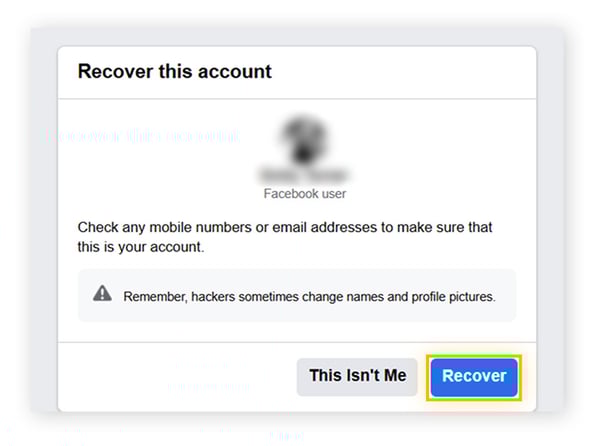
Facebook will give you various options to recover your account, including an option to take a video selfie.
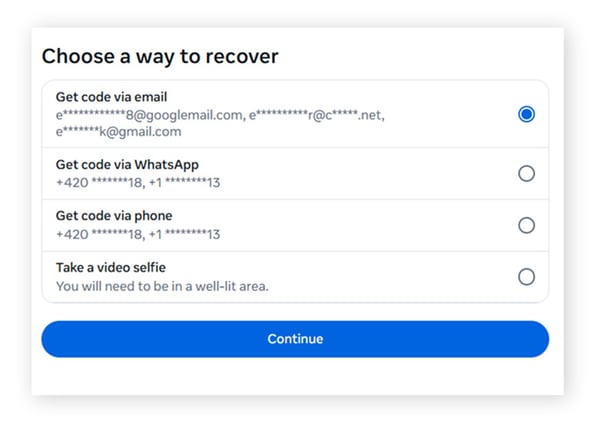
If you’re still unable to access your account after exploring this avenue, you may have hit a dead end. Facebook does not have a dedicated customer service center for users whose accounts have been hacked, so if you have reported your account as compromised and still have not been able to recover your account, Facebook does not offer any additional options.
Use a trusted third party-recovery service
As a last resort, some third-party recovery services might succeed in recovering your hacked Facebook account when you’ve hit a dead end. Make sure you choose a trusted and legitimate service before sharing personal details or making a payment, as there are scammers out there who will take advantage of the situation to steal your personal information.
These services can cost a pretty penny and will not guarantee success, but most legitimate providers will offer a refund if they do not manage to recover your account.
How to prevent your Facebook account from being hacked again
If you’re able to recover your account, commit to some online security best practices to help avoid getting hacked in the future. Here are the top things you should do to keep your online accounts secure from hackers:
Use strong passwords and a password manager
Avoid using the same password across multiple accounts, never share your account passwords with anyone else, and create strong passwords, ideally containing 15+ characters. Using a password manager can help you generate effective passwords, store them securely, and autofill them so it’s easier to log-in across devices.
Turn on two-factor authentication
Two-factor authentication, or 2FA, adds an extra layer of security to make sure that even if a hacker gains access to your login details, they won’t be able to sign in without a code sent via email or SMS. You can also set up 2FA using a dedicated authentication app like Duo Mobile or Google Authenticator.
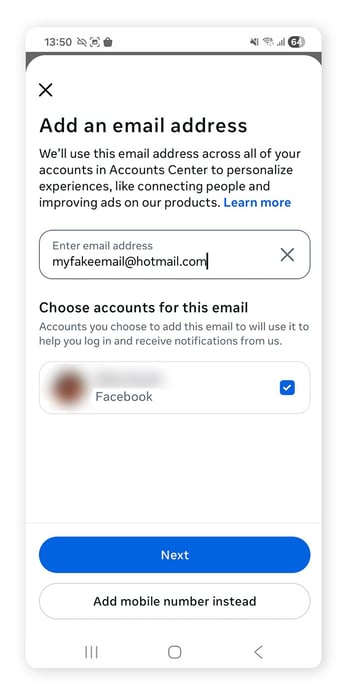
Set up a recovery email
You can add a secondary email to your account alongside your primary email to increase your chances of being able to recover your account if it’s hacked.
To add a secondary email, go to Settings & privacy > Settings > Account Center > Personal details > Contact info. Click Add a new contact > Email address. You will need to open the email sent to the newly added email address to confirm the account.
Don't link payment methods to your account
It can be tempting to add payment methods directly to your account for the sake of convenience, but this is a big security risk that can expose you to financial consequences if your account is hacked.
If you have payment methods linked to your Facebook account and want to prioritize safety, you can remove them by going to Settings & privacy > Settings > Account Center > Meta Pay. Then, click the Manage tab, choose the method (card, PayPal, bank account, etc.) you want to remove, click Remove, and confirm.
Unlink third-party apps
Using the ‘log in with Facebook’ option when signing in to another app is a convenient option, but it can compromise linked accounts if your Facebook account is hacked, also potentially preventing you from accessing these accounts if you lose access to Facebook.
Generally speaking, it’s safer to set up separate login credentials (including a unique password) for every account you create. Linking untrusted third-party apps can also make your Facebook account more vulnerable to hacking, so it is best not to have any third-party apps linked to your Facebook account.
To unlink third-party apps from your Facebook account, go to Settings and privacy > Settings > Apps and websites. You will see a list of apps connected to your Facebook account. Click on an app and click Remove.
Safeguard your social media against hackers
Recovering a hacked Facebook account is just one half of the problem. Preventing it from being hacked again is the other. AVG Antivirus Free can help, offering real-time protection against threats like scams, fake websites, and malware. Plus, you’ll get access to additional features like a Network Inspector that helps keep your home network safe from online intruders, so you can rest easier knowing AVG is working 24/7 to help keep you safer online.



.png)
.png)










/Signal-Have-you-been-hacked-and-what-to-do-about-it-Thumb.jpg)
%20-%20refresh/The_Most_Dangerous_and_Famous_Hackers_Today-Thumb-refresh.jpg)


/How-to-prevent-router-hacking-Thumb.jpg)


