What is the Monkey app?
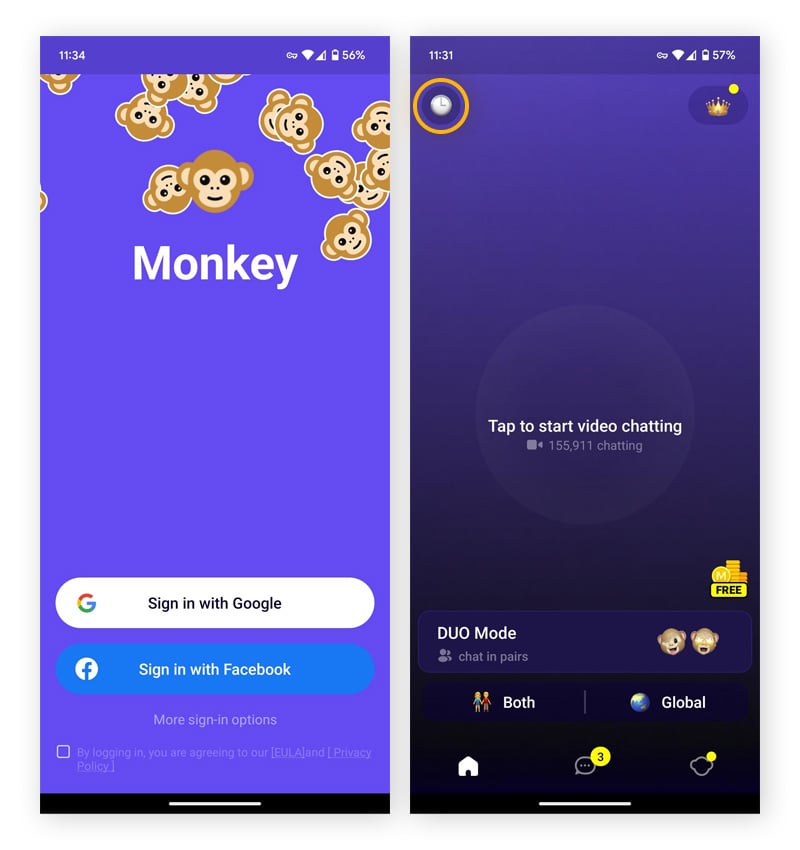
The Monkey app is a video chat and social networking app, designed to target Gen Z teenage users — users are randomly matched to strangers for a 15-second face-to-face video call.
Developed and launched in 2016 by five Californian teens, Monkey video chat describes itself as being like speed dating for friends. After pairing you with another user at random, the video chat starts as a 15-second face-to-face call to see if they “vibe with you.”
If both users tap the Time button on the screen, the video chat will continue. Otherwise, they’re automatically reconnected to a new user for a new 15-second chat.
What is the Monkey app used for?
Monkey app is used for texting strangers, sharing updates with friends, and video chatting with random people, similar to Chatroulette and the now-defunct Omegle, but with social media features that teens know and love — such as filters, stories, and card swiping — alongside profile data including your username, age, gender, and location.
Here are some ways Monkey app features are used:
-
Text messaging strangers: Users can text chat and create group conversations on the Monkey app.
-
Sharing updates with friends: Users can add “moments” to their profile (like a short video with songs).
-
Random video chatting: The Monkey app connects users with random strangers worldwide.
-
Matching with new friend connections: Monkey lets users swipe through profiles to initiate chats and create new friends.
-
Matching with interest and gender: Users can filter potential matches by specifying their preferred gender and interests of users.
While these features can seem fun or social, they may also be misused, putting users at risk of exposure to inappropriate content, manipulation, or unsafe interactions. So it’s important to use the app with caution and awareness of the risks of using the Monkey app.
Is the Monkey app legit?
The Monkey app is a social networking app with over 30 million users worldwide that’s popular with teens. Due to safety concerns, it was removed from Apple’s App Store, but it’s available for Android devices (depending on regional restrictions) and on desktop browsers. Common Sense Media recommends it for users aged 17 plus, while the 3.5-star-rated app on the Google Play Store is listed for users aged 18 and over.
Monkey app safety credentials
The Monkey safety guidelines state that the app has a “zero-tolerance policy” against cyberbullying and threats, and that it takes “extraordinary steps” to protect users, including a 15-second timer and built-in reporting tools. However, these measures may fall short of adequately protecting users — especially minors — from potential online risks.
Here’s an overview of Monkey’s safety features:
-
AI monitoring: Machine learning is used to detect sexual content or activity that otherwise violates its policies.
-
Self-governed reporting: If a user sees inappropriate content during a video chat, pressing the police emoji icon will initiate a report to the moderation team.
-
Active moderators: Monkey also employs a 24/7 moderation team to review reports submitted by users and offer support via email.
-
15-second safety timer: Once matched with a stranger, you’ve got 15 seconds to decide to keep chatting (by tapping Time) or to move on (by tapping Next). This helps to reduce exposure to unwanted or uncomfortable encounters.
-
Strict community guidelines: Users must agree to Monkey’s terms and guidelines at sign-up, but since the full details aren't shown upfront, many may be unaware of the specific rules.
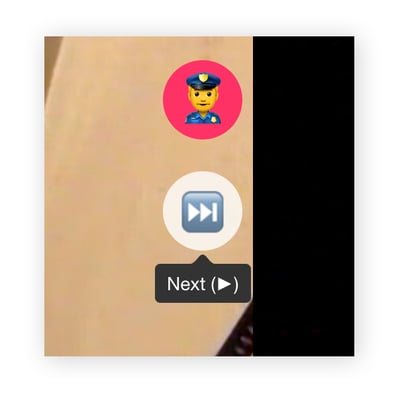 The police emoji icon on the Monkey app.
Despite Monkey’s safety policies, sexually explicit content on the app is commonplace. Unlike some iPhone and Android apps, where you can optimize app permissions to help stay safe, with the Monkey app, you have to take it or leave it.
What happened to the Monkey app?
The Monkey app for iOS was removed from the Apple App Store due to safety concerns. However, iPhone users can still access Monkey via their mobile web browser, meaning that it remains available to these users in the US and most other countries.
In short, Monkey still exists, but only on Android and desktop platforms.
Issues with the Monkey app
Due to lax age verification policies, privacy concerns, and persistent issues with harmful and sexual content, the Monkey app cannot be trusted to keep your children safe online. We tested the app ourselves and were exposed to highly inappropriate sexual content within the first 30 seconds.
Additionally, the consensus among authoritative bodies around the globe is that kids should not use the Monkey app.
-
The US internet safety advocacy group, Protect Young Eyes, concluded that Monkey “is not safe for kids and should be avoided.”
-
The Washington Post reported that 2% of reviews left for Monkey included complaints of unsolicited sexual advances, including people targeting children. The Post dubbed the Monkey app as “inappropriate” for teens due to sexual content targeting minors.
-
The UK-based Safer Schools safeguarding app released an alert calling Monkey “extremely dangerous.”
-
The iNECE Safeguarding Group issued a safety alert on the Monkey app, describing Monkey as “an extremely dangerous website.”
Here’s a closer look at some of the foundational flaws of the videochat app, Monkey:
No age verification
Monkey officially requires users to be 18 or older to use the app, but there’s no age verification process in place. Although people are required to input their date of birth when signing up, there’s nothing stopping a young child from entering a fake birthdate to access Monkey video chat.
This lack of verification means that adults can also manipulate their profiles to make themselves appear much younger than they are and game the algorithm into matching them with young, potentially underage, users.
Similar video apps that risk exposure to mature content can be filtered. For example, parents can let kids watch YouTube safely by using the kid-safe version (YouTube Kids) or by adjusting parental controls either on the device or within the YouTube app itself. Monkey doesn’t have such controls, and users cannot know what or who they will see when connecting.
Limited user privacy
Monkey is a social network app centered around the sharing of personal information and the lowering of privacy barriers. You can’t use the app without giving it access to your camera and microphone, and it also involves sharing other types of potentially sensitive information, such as:
-
Personal information: Registering an account on Monkey requires you to enter your name and date of birth, and provide a profile picture, although this can be an anonymous avatar.
-
Device and usage data collection: Like many apps and websites, Monkey automatically collects data — such as your IP address, browser type, device information, and how you interact with the app — which is typically used for analytics, targeting, or troubleshooting.
-
User-generated content: Although not required, users are encouraged to share personal photos, videos, and screenshots with other users in the form of moments.
The app further undermines user privacy by failing to guarantee protection against data loss, misuse, or alteration. This means you could lose saved messages, have personal photos accessed by others, or have your information exploited or shared on other platforms like Telegram without your knowledge.
This lax approach to privacy and security exposes users to the risk of data breaches, and it could give hackers easy access to spy on you via a hacked webcam if they infect your device with spyware.
Location data collection
Social media has made many people comfortable sharing personal details online, but automatic data collection — like your IP address — can expose more than you realize. Monkey, for example, uses your IP address to show other users your approximate physical location, meaning you can’t simply list a different city to stay anonymous. To hide your real location, you’d need to use a VPN, which routes your internet connection through a remote server.
Harmful content
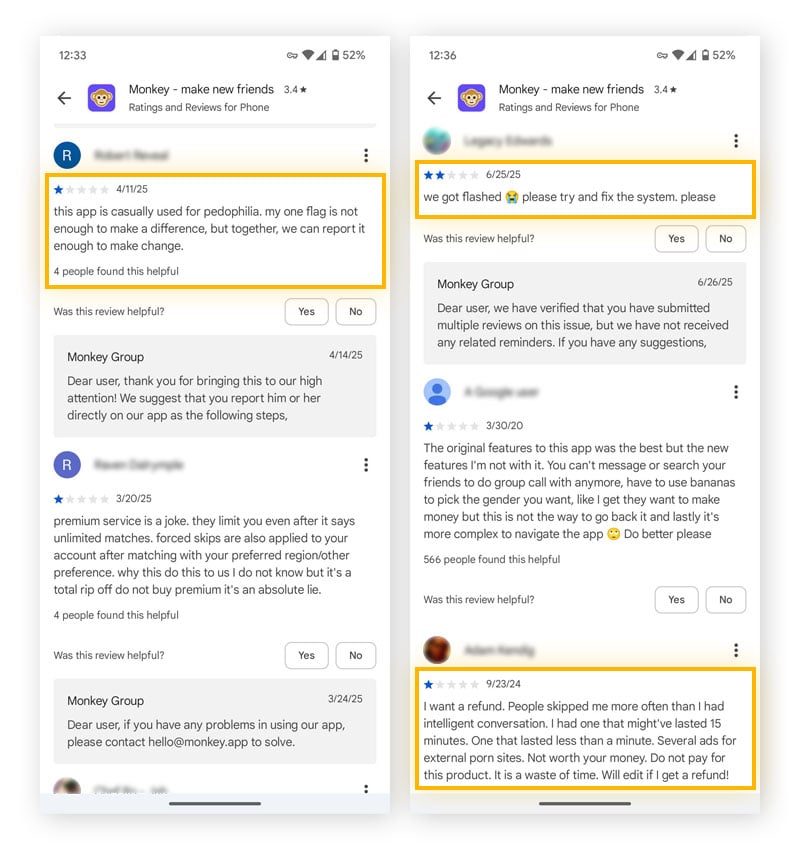
The most alarming issue with the Monkey app is the high risk of exposure to sexual and other inappropriate content. Despite its claims of moderation, reviewers report the platform is filled with ads for sex, pornography, masturbation, and even bestiality. Much of this harmful content appears briefly before disappearing, often so quickly that users don’t even have the chance to report the violation.
Self-governed monitoring
Monkey app openly states in its Safety Center that it largely operates as a “self-governing” platform where "people are given the power."
However, Monkey’s reliance on users to report inappropriate content, rather than using proactive moderation, creates safety risks — especially for teens and children. Waiting for the moderation team to respond to reports and potential user hesitation to report means that harmful content can slip through the cracks.
Anonymous users
Users on Monkey can remain anonymous by using fake names and adding minimal profile information. The app doesn’t verify identities, making it easy to conceal true identities and catfish other users.
Without identity checks and accountability, predators can pose as legitimate peers, and even average users may feel emboldened to act inappropriately. This creates a high-risk environment for exploitation, harassment, and exposure to harmful content.
Even when users are flagged and banned, the app’s weak identity verification allows them to easily create new accounts, making repeat offenses common and undermining the entire moderation system.
Limitations of reporting
Monkey's main reporting tool is via the police emoji, which users can tap during a video chat to flag inappropriate behavior. However, this system has several flaws:
-
It’s not immediate or intuitive enough: The fast-paced nature of video chats (with only 15-second decisions) gives users little time to assess and report behavior.
-
There are unclear outcomes to reporting: Users are often unsure what happens after submitting a report — there’s no transparency about actions taken by the moderation team.
-
Relies heavily on users to submit reports: The app depends entirely on users to identify and report violations, rather than preventing harmful content proactively.
-
Reported users can continue to use the platform: While a reported user is under review by the moderation team, they can remain active on the platform, exposing other users to potential repeat offenses before action is taken.
-
Lack of reporting options: When reporting inappropriate behavior on the app, users are limited to just two broad categories — “Underage” or “Violation of Community Guidelines.” Without the option to provide details, moderation is less effective, and the chances of appropriate action being taken are reduced.
Ties to other dangerous chat sites
The Monkey app does not have formal ties to other chat platforms like Omegle, Chatroulette, Holla, or Azar. However, following Omegle's shutdown in 2023, Monkey gained popularity as an alternative, particularly among teens and young adults.
How does the Monkey app work?
The Monkey app connects strangers through a simple matching system. Users create profiles and are paired using a built-in algorithm that considers shared traits and interests. Once matched, they can chat through direct messaging and video features, making it easy to meet new people and start conversations online.
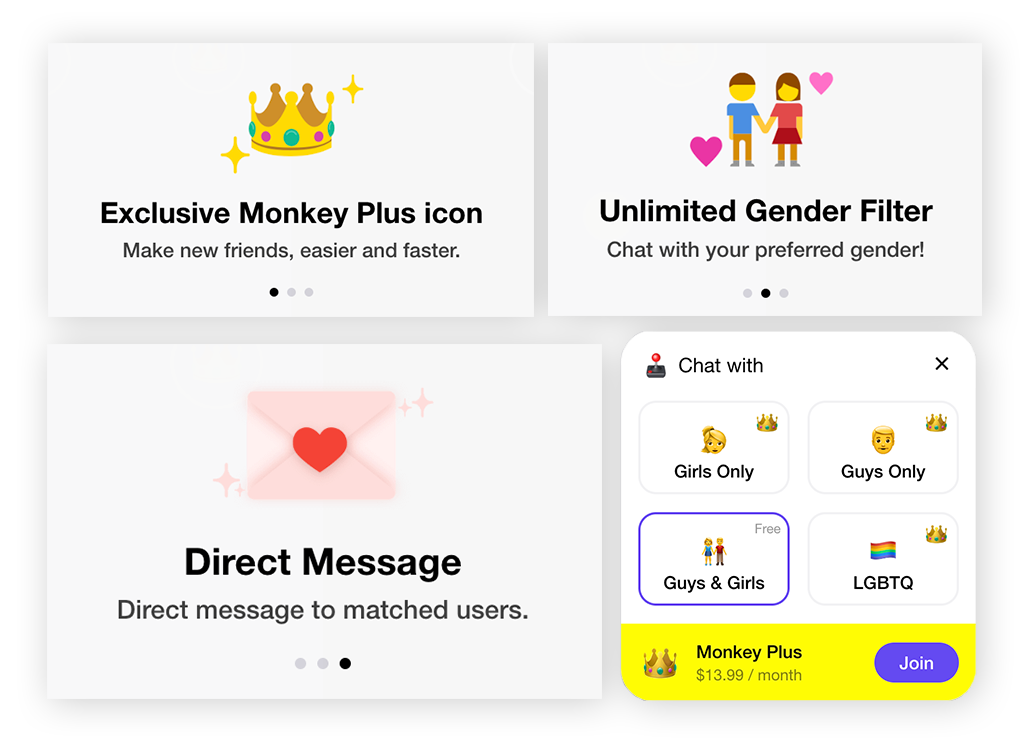
Monkey Plus is a paid upgrade that offers extra features like advanced filters, unlimited skips, and no ads. However, it has received numerous negative reviews on the Google Play Store, with users reporting poor value, glitches, and limited benefits for the price.
Profiles and moments
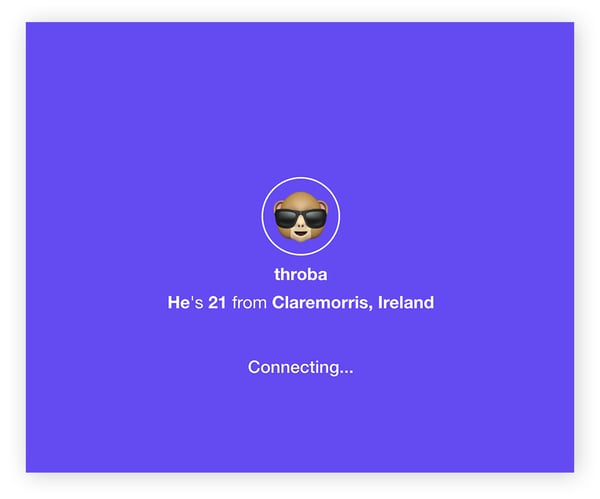
To start using the Monkey app, you can create a profile by linking your Google or Facebook account. The app automatically imports details such as your name, date of birth, gender, and location. When browsing other users, the only information you’ll see is their gender, profile photo, username, age, and location.
The free version of Monkey provides basic functions, including creating a profile and posting “moments.” Like other social media platforms, you can follow users to view their content and check their follower count.
Profiles resemble Instagram’s layout, with a bio under the profile picture and sections for interests and hobbies. By default, a zodiac sign — determined by your date of birth — appears on every profile and can’t be changed. Users can also set a mood and even choose a song that plays automatically when someone visits their profile.
A “moment” is Monkey’s version of a story feature, similar to Instagram’s or TikTok’s. Users can take photos or videos, edit them, and share them both on their profiles and in the app’s search feed. Because moments are publicly visible, this feature can be risky for people who overshare online.
DUO video chat
DUO is a Monkey app feature that matches pairs of friends or existing connections with other pairs for live, face-to-face video calls based on age, location, and shared interests. Like any video chat with strangers, it comes with both benefits and risks, but the group format can feel less intimidating for users exploring the app and meeting new people.
Adding connections as Friends
Participants can add each other as a connection by tapping the Friend button. But to video call a Friend or move things to a text chat, you must subscribe to Monkey Plus. This premium version of the app currently costs $13.99 a month or $6.99 a week, so be careful before signing up for paid features.
Knock Knock: Text-based chatting
The Monkey app’s Knock Knock feature offers text chat as an alternative to a video call — but only with a premium subscription. You can see the details of the person you want to chat with, including their name, profile picture, location, and Moments they have posted before sending a request to chat.
Knock Knock chats expire after 24 hours unless each person adds the other as a friend before the time elapses. Even so, Monkey is not considered to be a secure messaging app.
Cards: User matching
Cards are pictures of people in the surrounding area that users can swipe right or left on. If two users swipe right on each other’s cards, they will match. There is also a Super Like option that notifies a person that you want to talk to them.
Officially, the Monkey app is not classified as a dating app. But if the Cards feature sounds familiar, it’s because it works just like the matching feature on dating apps like Tinder.
Some Monkey Plus features make Monkey feel even more like a dating app, such as letting you sort matches exclusively by your preferred gender, apply an LGBTQ filter, and see who has liked them without having to run a match.
How to use the Monkey app safely
The safest choice is to avoid the Monkey app altogether. Experts and law enforcement agencies, including a Florida county sheriff’s office, strongly warn against its use — especially for teens — because of the high risk of explicit content, predatory behavior, and serious privacy issues.
If you choose to use the Monkey app, here are some ways to reduce potential harm:
-
Set personal boundaries: Limit your time on the app to avoid emotional fatigue or overexposure, especially when engaging in random chats or video calls.
-
Stay aware of your interactions: Regularly reflect on who you're talking to and the tone of those conversations. Be cautious of manipulative or overly personal messages from strangers.
-
Review privacy settings often: Ensure your profile and device settings are secure — disable unnecessary app permissions, like location sharing and access to your camera and microphone when you aren’t using the app.
-
Be conscious of online risks: Remember that not everyone online has good intentions. Avoid sharing personal details such as your full name, address, workplace, or contact information.
-
Know how to block and report: Familiarize yourself with the app’s tools to block or report users who behave inappropriately or make you uncomfortable.
-
Stick to meaningful connections: Try to connect with people who share similar interests or are part of your real-life circles. Avoid engaging with users who seem suspicious or overly forward.
-
Use device safety features: Take advantage of device-level controls like app time limits or content filters to maintain healthy app usage habits.
Safeguard your personal data with a secure and private browser
While you should be free to monkey around online as you please, you should never compromise your sensitive data when doing so. Whenever you’re online, use a secure, private browser.
Download AVG Secure Browser to establish a secure, encrypted connection to every website you visit, help prevent browser fingerprinting and other tracking techniques, and automatically block phishing attempts and other security threats.