AVG Cloud Management Console
Protect devices quickly and efficiently – from one central console
Why use the Cloud Management Console?

Monitor device security
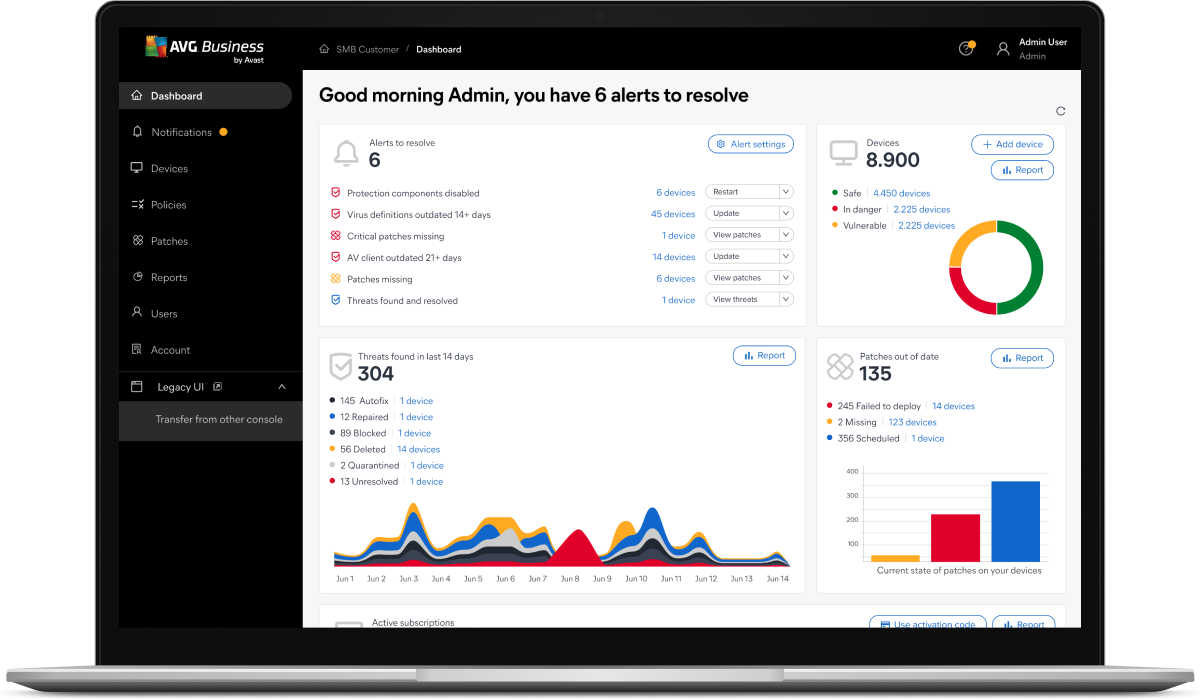
Oversee the health of all devices, monitor threats, schedule regular scans, and more from a single dashboard.

Quick and easy setup
Organize your devices into groups, create setting templates, schedule tasks, and remotely deploy antivirus - all from a single, intuitive dashboard.

Save bandwidth
Maximize efficiency by downloading and distributing threat updates and program updates to all devices, via a single interface.
The AVG Business Cloud Management Console is free to use with any AVG business product, and there are no maintenance costs.

Intuitive dashboard
View all alerts at a glance, address issues, and provide the information you need to make informed decisions, add services, and quickly take action to increase uptime, stability, and security.

Comprehensive reporting
Generate and schedule easy-to-read, detailed activity reports with the click of a button. View reports that include blocked threats, task lists, protected devices, patch statuses, and more.

Device and policy management
Manage security for all devices with the Cloud Management Console agent. Policy changes will automatically configure themselves on the agent-controlled devices in real time, requiring less maintenance and making it easier to scale business operations.

Alerts & notifications
Receive in-app alerts and instant email notifications on any security threats or network issues that need your attention, including outdated antivirus applications, extended device inactivity, and additional device updates.

Master agent
Select a device as the Local Update Server, where all updates can be downloaded. Save bandwidth by scheduling and distributing updates to all endpoints in your network when it’s convenient.

Real-time commands
Instantly apply commands across devices like scans, restarts, and more. Run commands automatically based on policy settings.

Network Discovery
Discover all devices connected to your network and remotely deploy security services to unprotected workstations and servers.

Business API Gateway
Speed up your operations with APIs (application programming interfaces) that seamlessly integrate our online management console with your external systems.

Cloud-managed antivirus for business
AVG Cloud Management Console is a cloud management platform that helps businesses improve efficiency and security within their company's managed computers. Real-time updates minimize security gaps, helping identify malware and ransomware threats before they infect your network.
With Cloud Management Console, the security of managed devices can be configured and monitored from one, central hub.
What is cloud-managed antivirus?
Cloud-managed antivirus improves protection and efficiency for businesses. This is done through centrally managed control via AVG Cloud Management Console.
Having real-time data means that patches can be applied quickly, and updates can be completed across your network’s computers without relying on employees to update their systems.

How cloud-managed antivirus works
Cloud-managed antivirus uses a management platform with two key elements:
- A cloud-based web service that updates the cyberthreat detection database and blacklists of dangerous sites and software. This information is shared in real-time with a client’s local devices.
- A client program. This is an antivirus scanner installed on local devices to scan for malware. Unlike a full local antivirus suite, this software is not that demanding on the local system.
As the entire computer system's security can be monitored and managed from a central console, changes are quick and simply to apply, which contributes to more consistent protection across the business network.
Benefits of cloud-managed antivirus solutions
- Cloud-managed antivirus can monitor endpoints across the network, helping stop malware and ransomware attacks before they spread.
- Internet security scans, patches, and updates for the entire network’s endpoints can all be managed from the Cloud Management Console, a central hub, helping to eliminate gaps in your protection.
- The low footprint of cloud-managed antivirus means that individual machines will not be slowed down as they might be when traditional antivirus software is performing scans or updating.
- The responsibility for applying updates will be removed from individuals and can be automatically completed across the network’s endpoints at times when it will impact productivity the least.

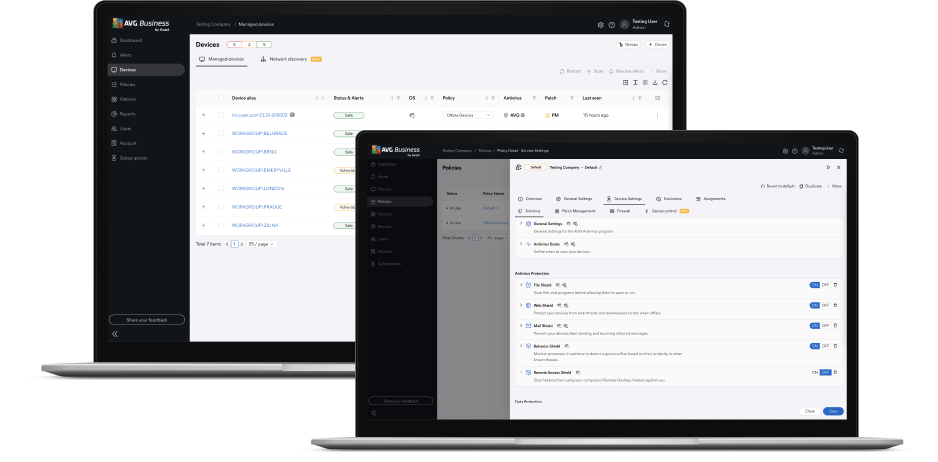
Intuitive dashboard, simple controls - for an optimal user experience
- Monitor all connected devices from a single dashboard.
- Add devices, products, and services directly from the console.
- Plan scans and updates to fit your schedule.
Set up your console in minutes
-
Select your antivirus
Start by choosing from an antivirus plan. Continue with your order and then create an AVG Business account.
-
Set up your console and install your antivirus
Take a look around and review the onboarding, which will help you deploy installers to your devices.
-
Done! Your business is now protected
Devices with installed antivirus will appear in the console. You can now activate and organize them into groups, schedule tasks, and customize settings.
Choose your level of protection
|
Compare & choose the best security for your business
|
|||
|---|---|---|---|
| 24/5 English support* Experts are just a phone call or email away. |

|
|
|
| Cloud Management Console Manages your network and devices remotely from a single location. |
|
|
|
| File Shield Detects and removes malware and viruses from your PCs and laptops. |
|
|
|
| Email Shield Inspects incoming and outgoing emails for malware and spam. |
|
|
|
| Web Shield Blocks harmful downloads and dangerous websites before they open. |
|
|
|
| Link Scanner Scans every link, including those on Facebook and Twitter, for potential threats. |
|
|
|
| Behavior Shield Works in real-time to sniff out suspicious behavior of any software running on your computer and warn you if anything is amiss. |
|
|
|
| Firewall Filters network traffic and prevents untrustworthy connections. |
|
|
|
| File Shredder Permanently deletes files that you don’t want recovered. |
|
|
|
| CyberCapture Sends unrecognized files to Avast’s Threat Labs to be analyzed in real-time. |
|
|
|
| Smart Scanner Quickly scans your computer for performance or security issues. |
|
|
|
| SharePoint Protection Analyzes everything that’s uploaded and downloaded to your servers. |
|
|
|
| Password Protection Automatically secures passwords saved in Chrome and Firefox browsers for extra protection and peace of mind. |

|
|
|
| Exchange Protection Scans and checks emails for suspicious attachments, spam and links. |
|
|
|
|
Money-Back Guarantee Buy without risk! If you're not satisfied in the first 30 days, we'll refund your money. Learn more* Czech, German, and French support is available 8 hours a day for 5 workdays. |
$46.99
|
$56.99
|
|
|
$46.99
|
$56.99
|
||
|
$46.99
|
|||
|
$56.99
| |||


Compatible Web Browsers
- Firefox
- Google Chrome
- Internet Explorer
- Microsoft Edge
- Safari
Latest versions are recommended.
FAQs
What is a cloud management service?
A cloud management service allows for the control of an endpoint antivirus using a cloud platform. A management service tool is used to maintain and optimize the configuration of services across a network’s computers for improved efficiency.
Why is cloud antivirus important for business?
Cloud-managed antivirus helps the entire business’ computers have protection by providing real-time virus definitions and automatically updating antivirus software so that every computer connected to the network has equal security.
Cloud-managed antivirus also reduces downtime caused by conducting manual updates on each device and helps minimize the risk of a computer being incorrectly updated and becoming a security weak point.
Centralized control means that the business network can be quickly amended and updated. A key functionality of cloud management platforms is creating group policies and scheduling tasks – all from a single, intuitive dashboard.
What are the benefits of cloud security management?
- Scalability – Cloud security can be deployed over as many endpoints as required, making it flexible for when your business experiences changes in demand or has plans to expand.
- Real-time updates – Cloud management is designed to make sure that every connected device is notified of new cyberthreats, helping to stop potential attacks as early as possible.
- Device performance – Shifting the processing power demands of security software into the cloud means that computers will be under less strain, increasing resource and productivity
- Increased cyberthreat protection – Cloud Management Console users have access to a large and rapidly updated cyberthreat database without the need to update or store locally.
Is Cloud Management Console a CMP tool?
Yes, Cloud Management Console is a CMP tool. CMP stands for Cloud Management Platform.
Discover our business security tools